Customer presentation
Business Intelligence
One view of the business.
From information to understanding.
See the business clearly. Understand what happened. Identify why it happened. Find what needs attention. Move from KPI to evidence to action.

03 · Executive Overview
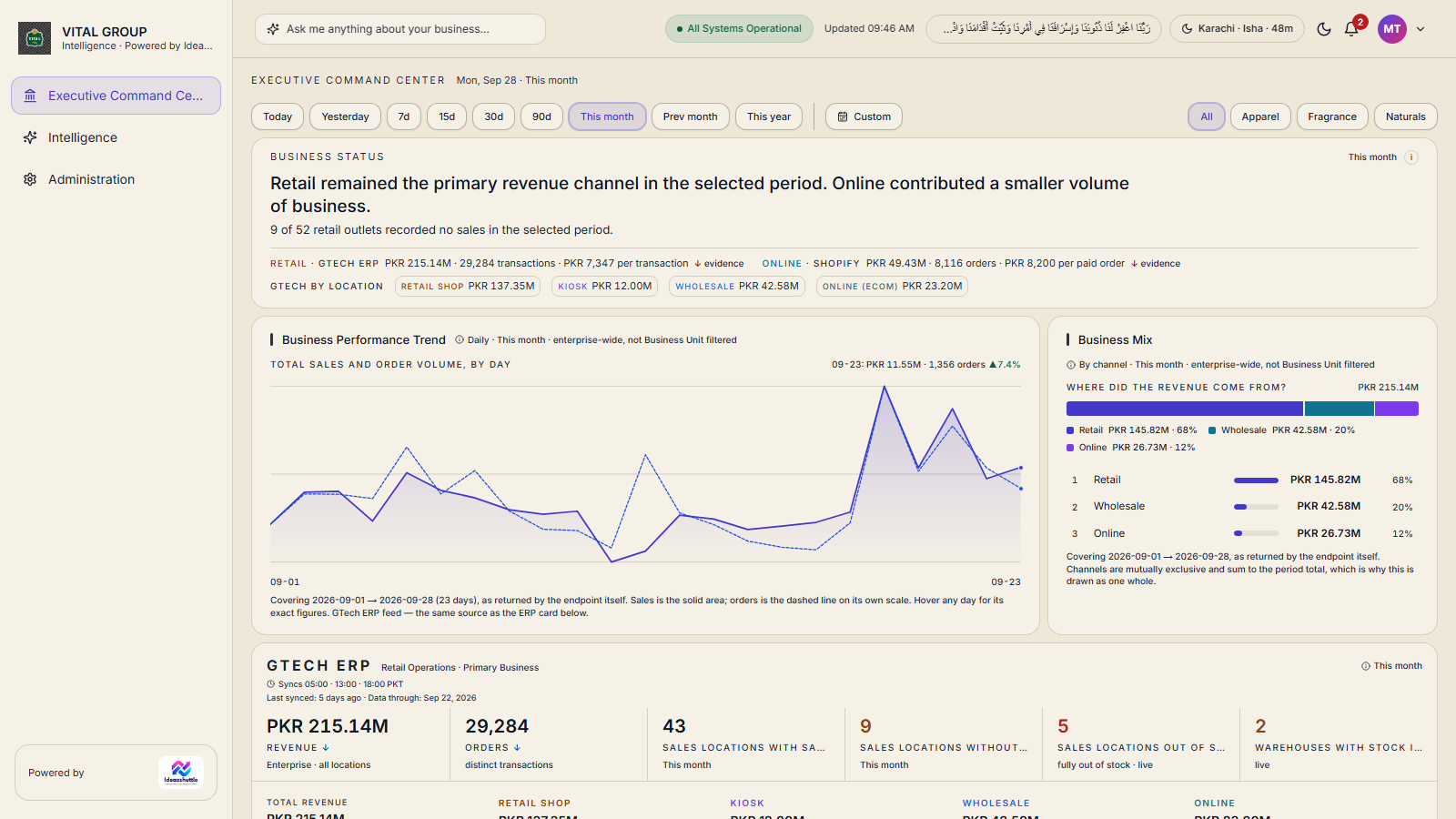
The Executive Command Center
One screen that states how the business is doing, where the revenue came from and what needs a decision.
- Business status in one sentence, for the selected period.
- Business KPIs — revenue, orders, customers, average order value, returns.
- Trends — daily business performance and the business mix by channel.
- Exceptions — locations without sales, locations out of stock, warehouses with stock issues.
- Attention areas — decisions needing attention, opportunities and risks.
- Drill-down — every figure carries an evidence link to the records behind it.
04 · The business at a glance
Every business area, one system
Business Intelligence organises the business into intelligence workspaces. Each one answers a question, ranks itself by urgency and links to the next.
Revenue · Orders
Locations · Channels
Out of stock · Negative stock
Warehouses · Movements
Online orders · Customers
Cash received vs awaiting
Couriers · SLA · Aging
Campaign Builder
Competitor information
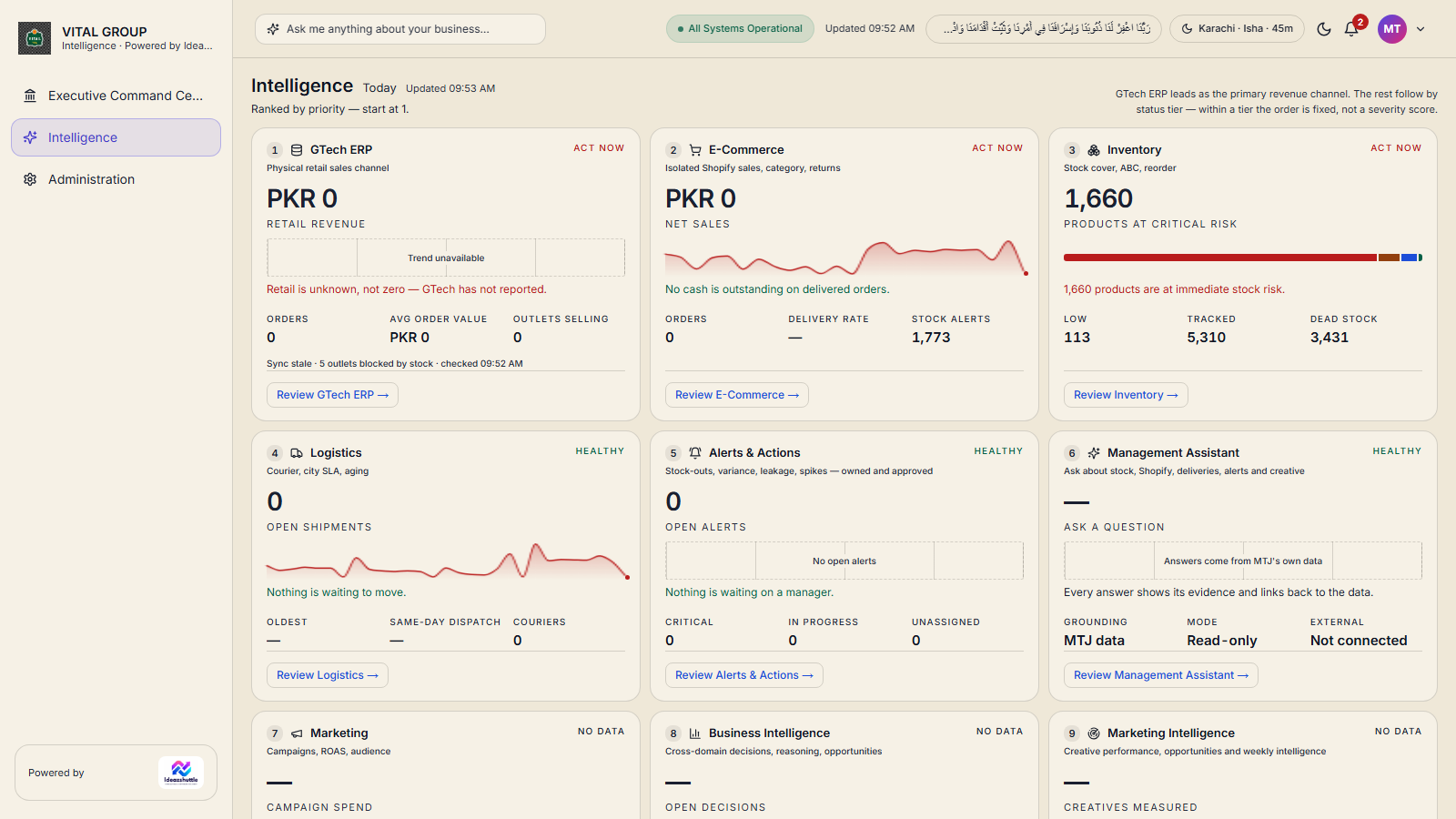
Global controls, everywhere
- Date range — Today, Yesterday, 7d, 15d, 30d, 90d, This month, Prev month, This year or a custom range.
- Business Unit — All (Enterprise), Apparel, Fragrance, Naturals. Users only see the units they are granted.
- Ask me anything — a question bar over the business's own data.
- Notifications, system status, light and dark themes.
05 · Drill down & traceability
From a number to its evidence
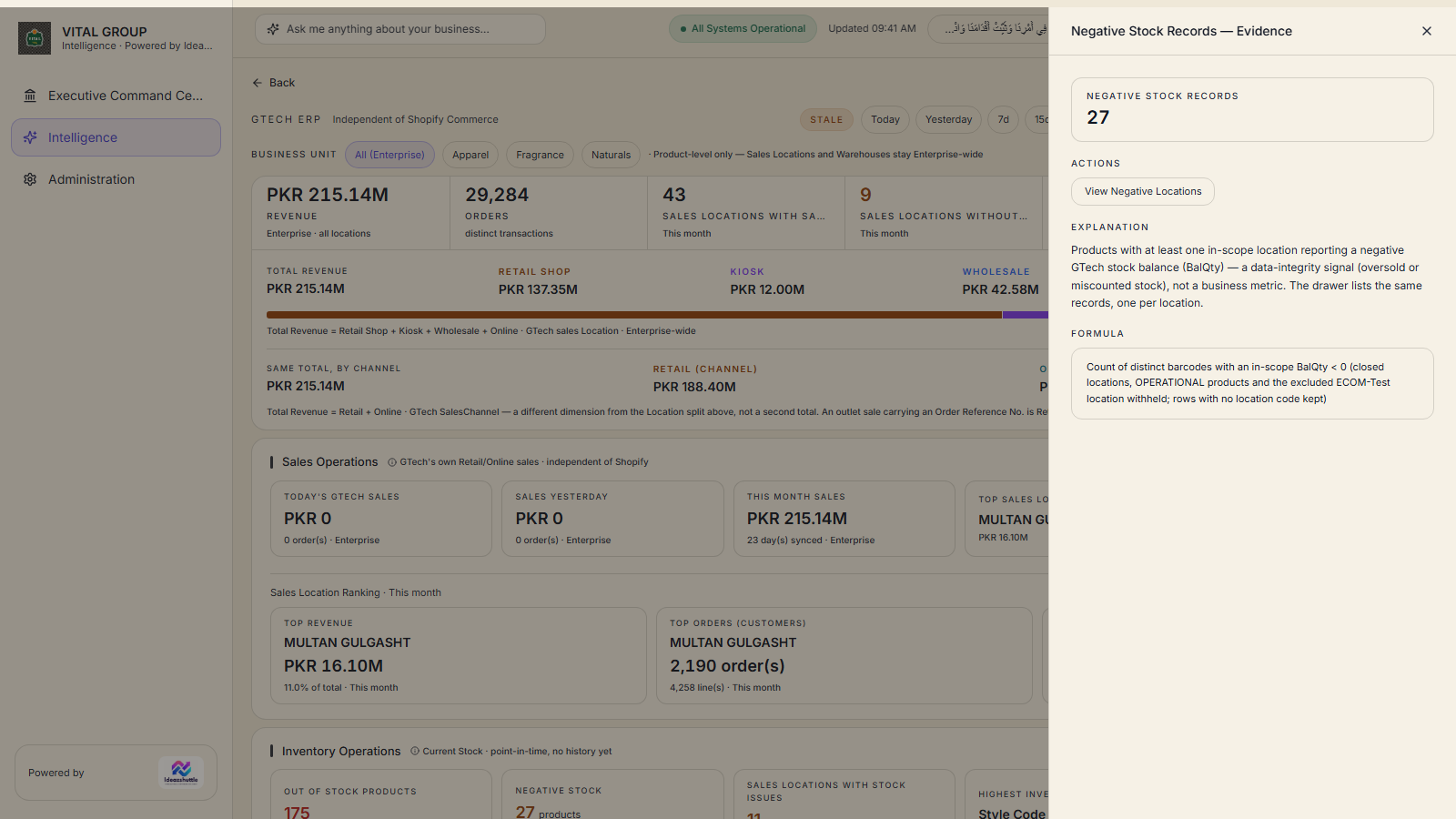
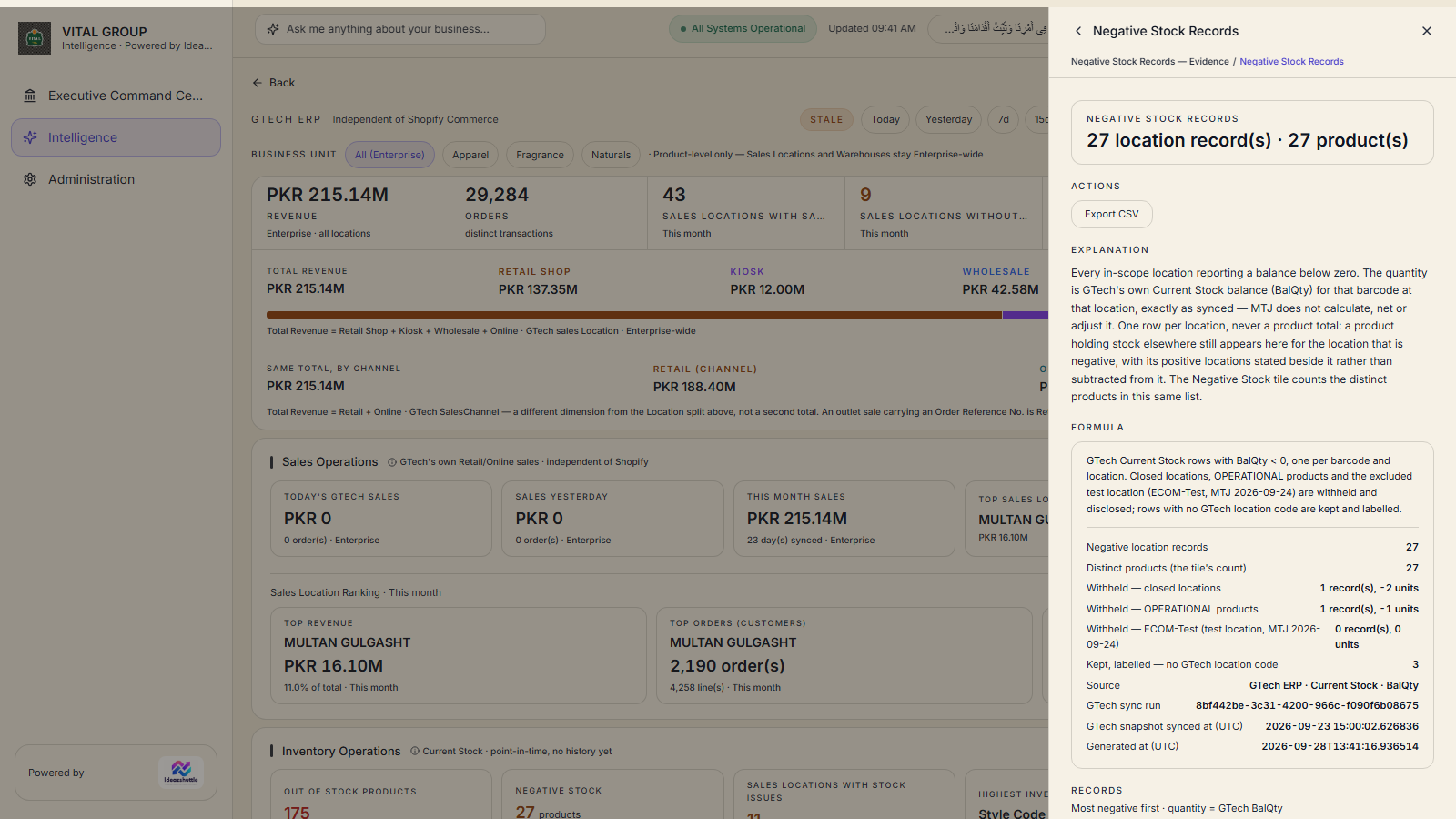
A headline figure is never the end of the story. Where the application holds the detail, the reader can keep going down.
Traceability is provided where the source data supports it. GTech retail sales carry no customer identity, so customer analytics exist for the online channel only. Each evidence panel states the data source and the last verified time.
06 · Sales Intelligence
Sales Intelligence
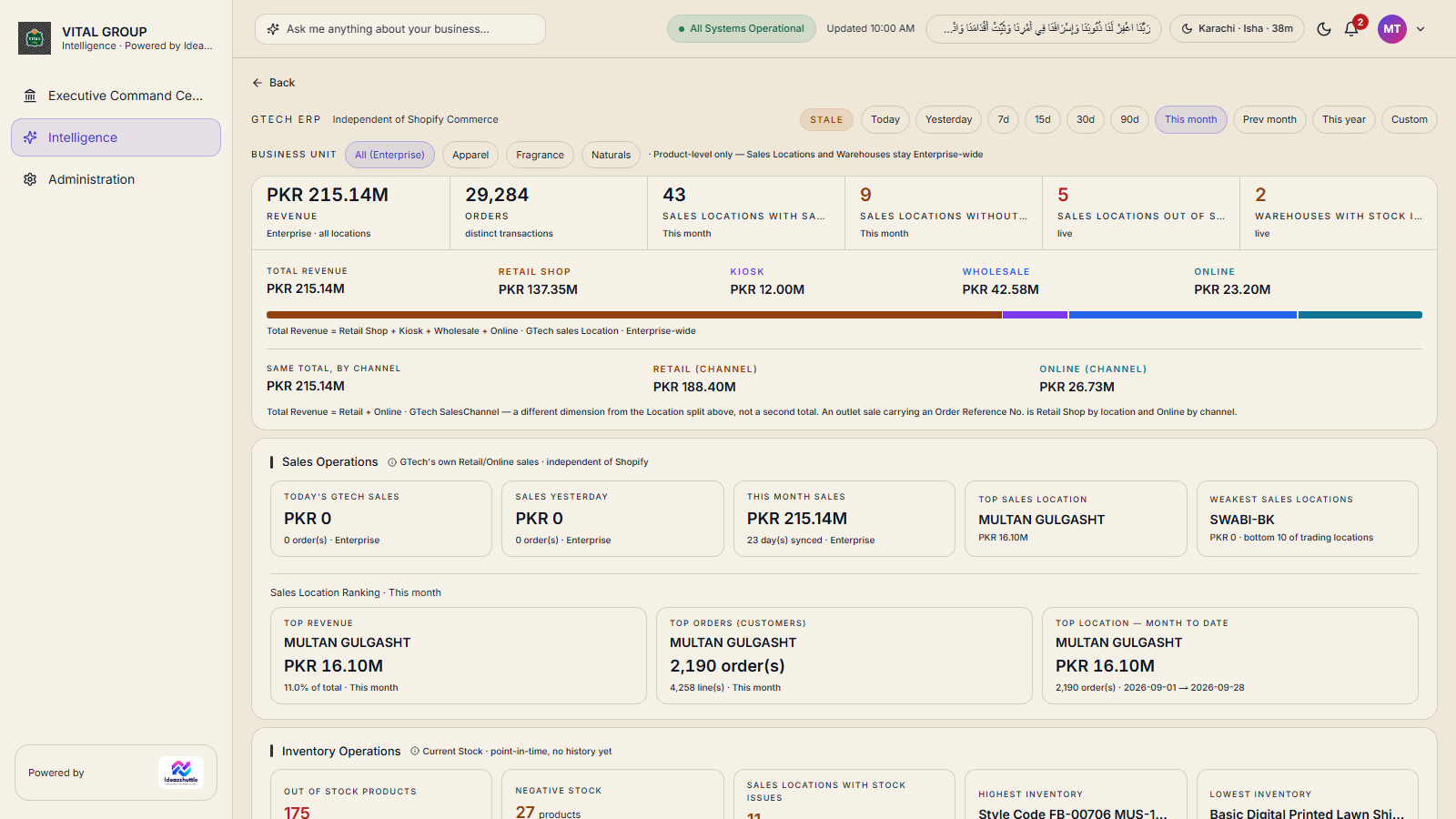
Retail and online sales from GTech ERP — by location, by channel, by business unit — with the top and weakest locations named.
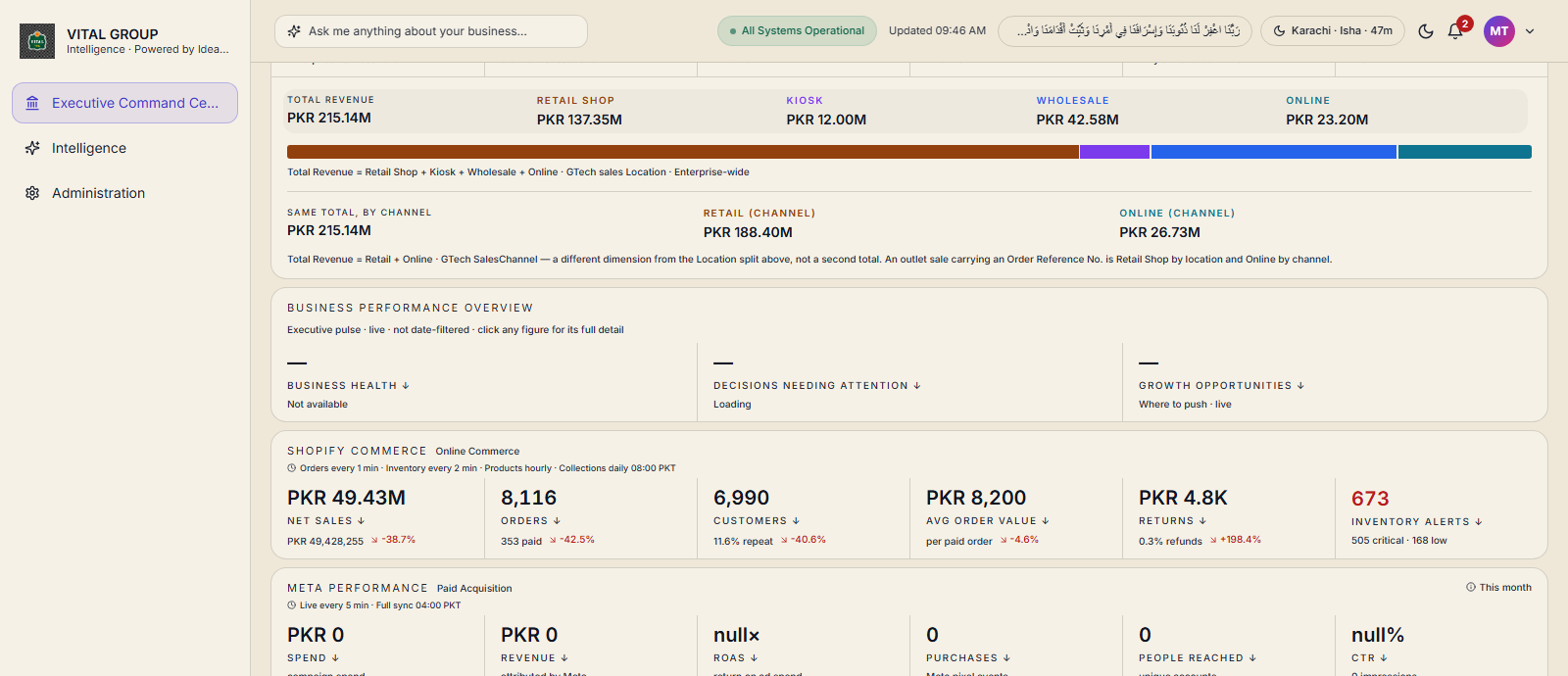
- Total revenue split by location type — Retail Shop, Kiosk, Wholesale, Online — and, on the same total, by channel — Retail, Online.
- Business Reporting: daily, weekly or monthly, grouped by brand, category, location type or channel.
- Physical Retail: outlet-by-outlet performance for every store and kiosk.
- CSV exports of sales, stock and master data.
07 · Inventory Intelligence
Inventory Intelligence
How much of the catalogue is at risk of running out, what needs reordering, and where stock is sitting.
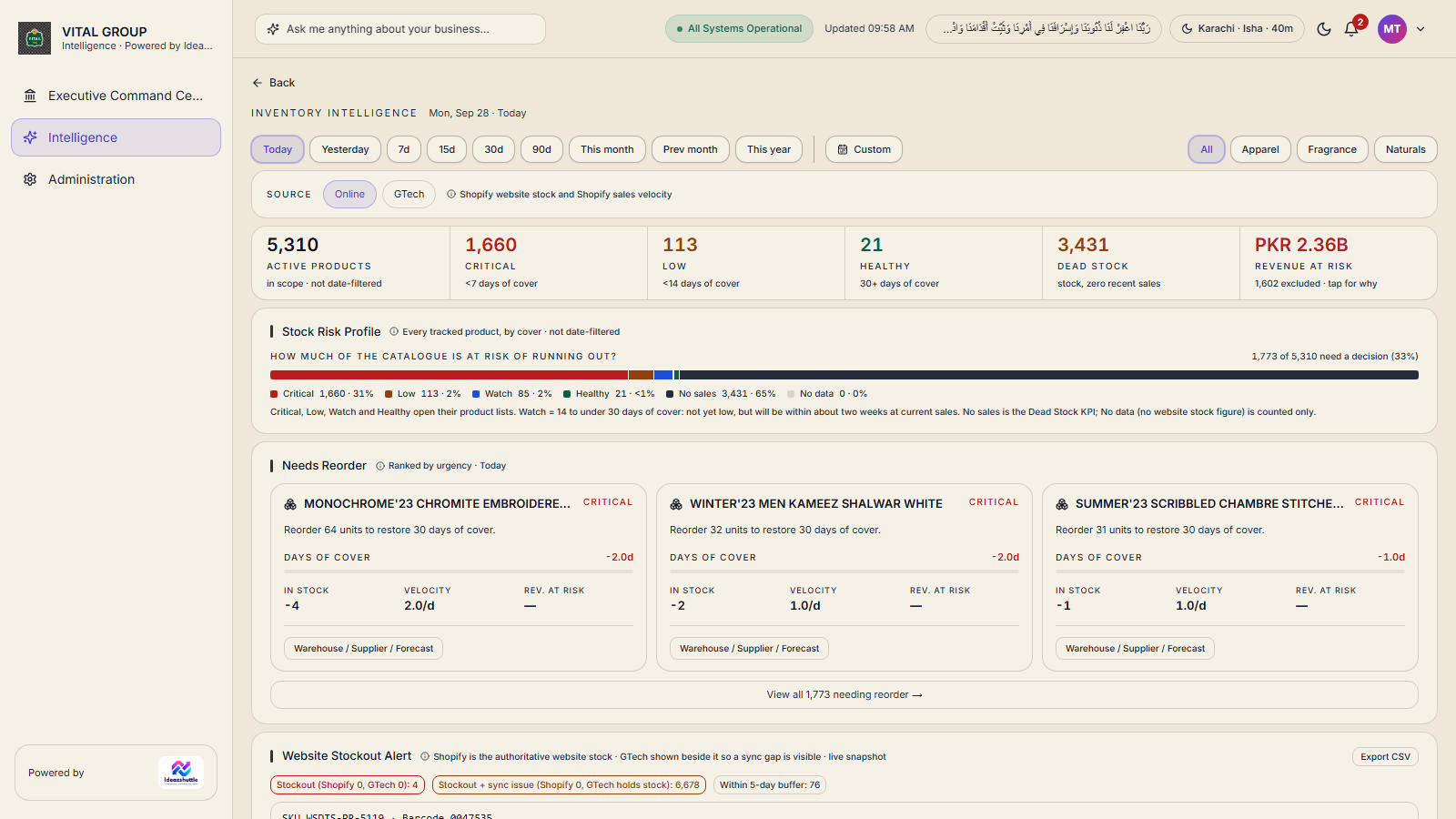
- Stock position — active products, critical, low, healthy, dead stock and revenue at risk.
- Out-of-stock and negative stock from GTech, with every record traceable to its location.
- Stock issues — sales locations and warehouses with more than half their tracked SKUs at zero.
- Location intelligence — inventory health by location, warehouse intelligence, recommended stock movements.
- Website stock visibility — Shopify website stock compared with GTech, sync gaps made visible.
Source balances, locations and product master come from GTech; website stock and sales velocity from Shopify. Calculated days of cover, risk tiers, reorder quantities and stock-out classes are computed by Business Intelligence from those sources.
08 · Commerce & E-Commerce
Commerce Intelligence
The online business as it really runs: orders placed, cash already received, cash still awaiting collection on delivery.
One online business, two systems
- Shopify is the storefront: orders, customers, payments and fulfilment events.
- GTech ERP records the same online sales under its Online channel. Online = ECOM (the e-commerce location) + Omni (online orders processed at a physical location).
- They are shown side by side for synchronisation monitoring — not as two separate businesses.
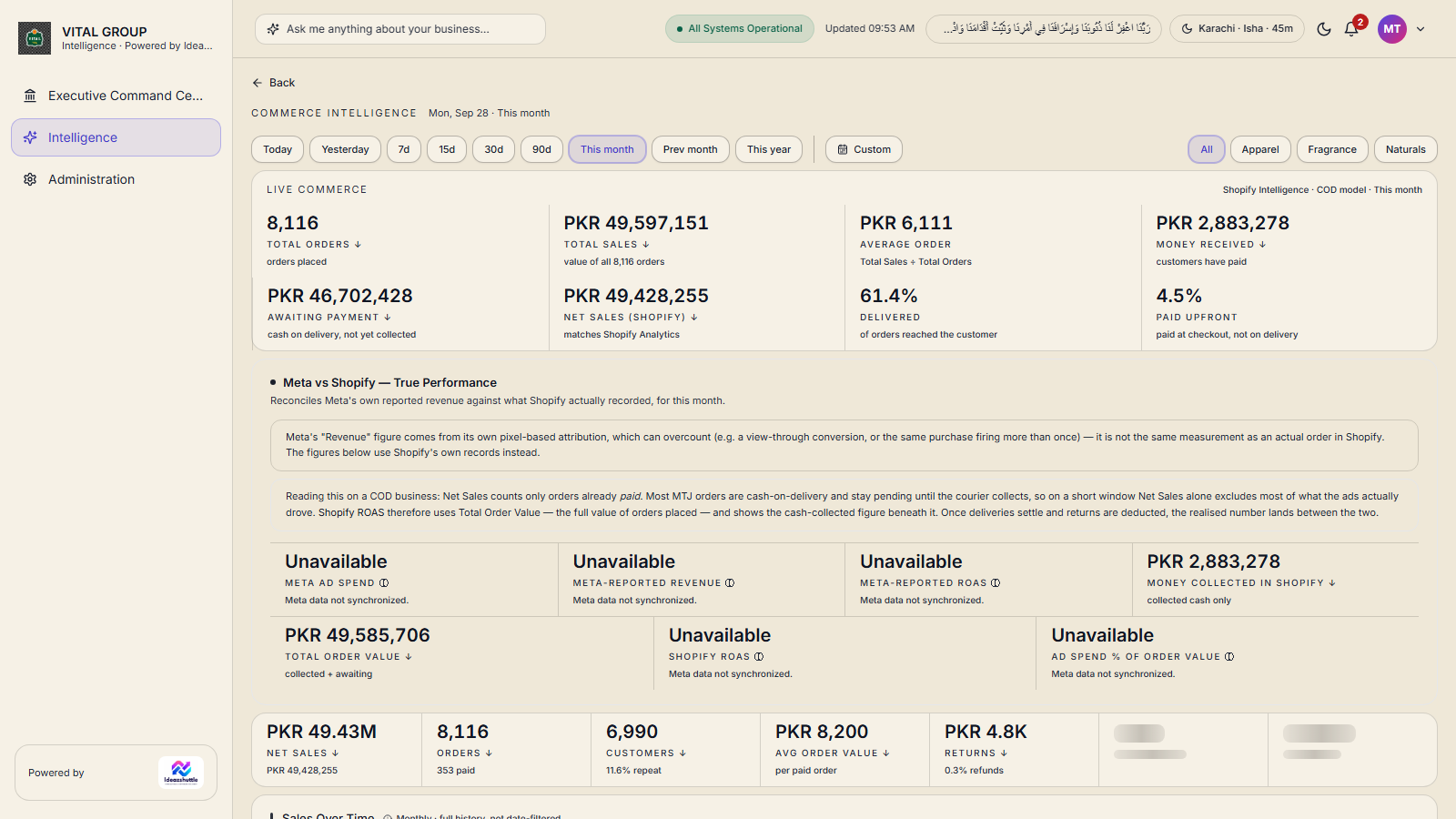
- Total orders, total sales, average order, money received, awaiting payment, net sales, delivered %, paid upfront.
- Customers, categories, products, returns, order-level reconciliation against the live store.
09 · Orders, fulfilment & logistics
Logistics Intelligence
Where every order is in its journey, how long it has been there, and which courier has it.
What it shows
- Dispatched · Delivered · Not Delivered for orders placed in the period.
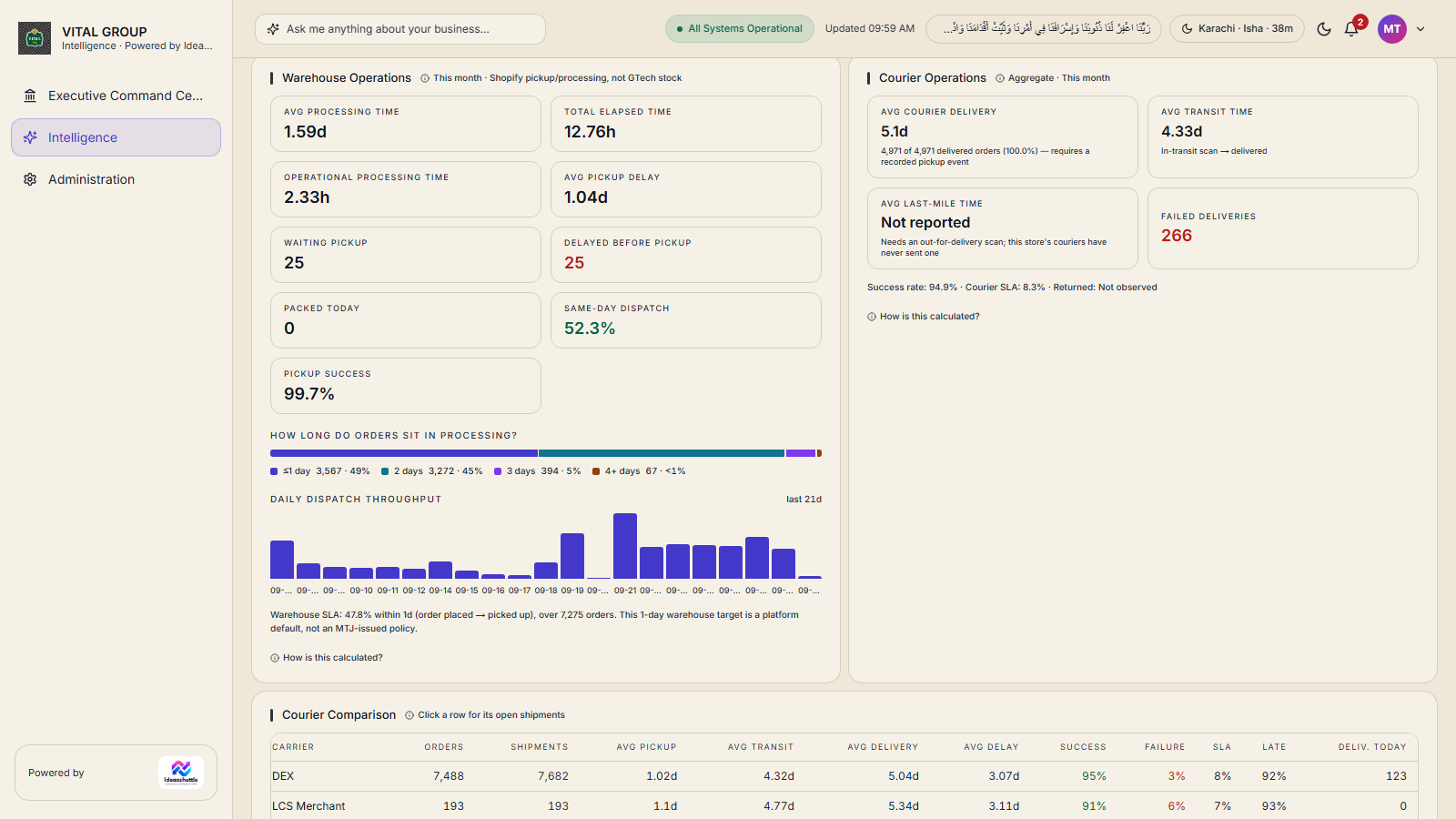
- Fulfilment — orders in window, delivery success, open orders, average turnaround, oldest open.
- Aging — open orders by age bucket, with an aging report and CSV export.
- Courier status — orders, delivered and failed per courier; a Find Shipment search.
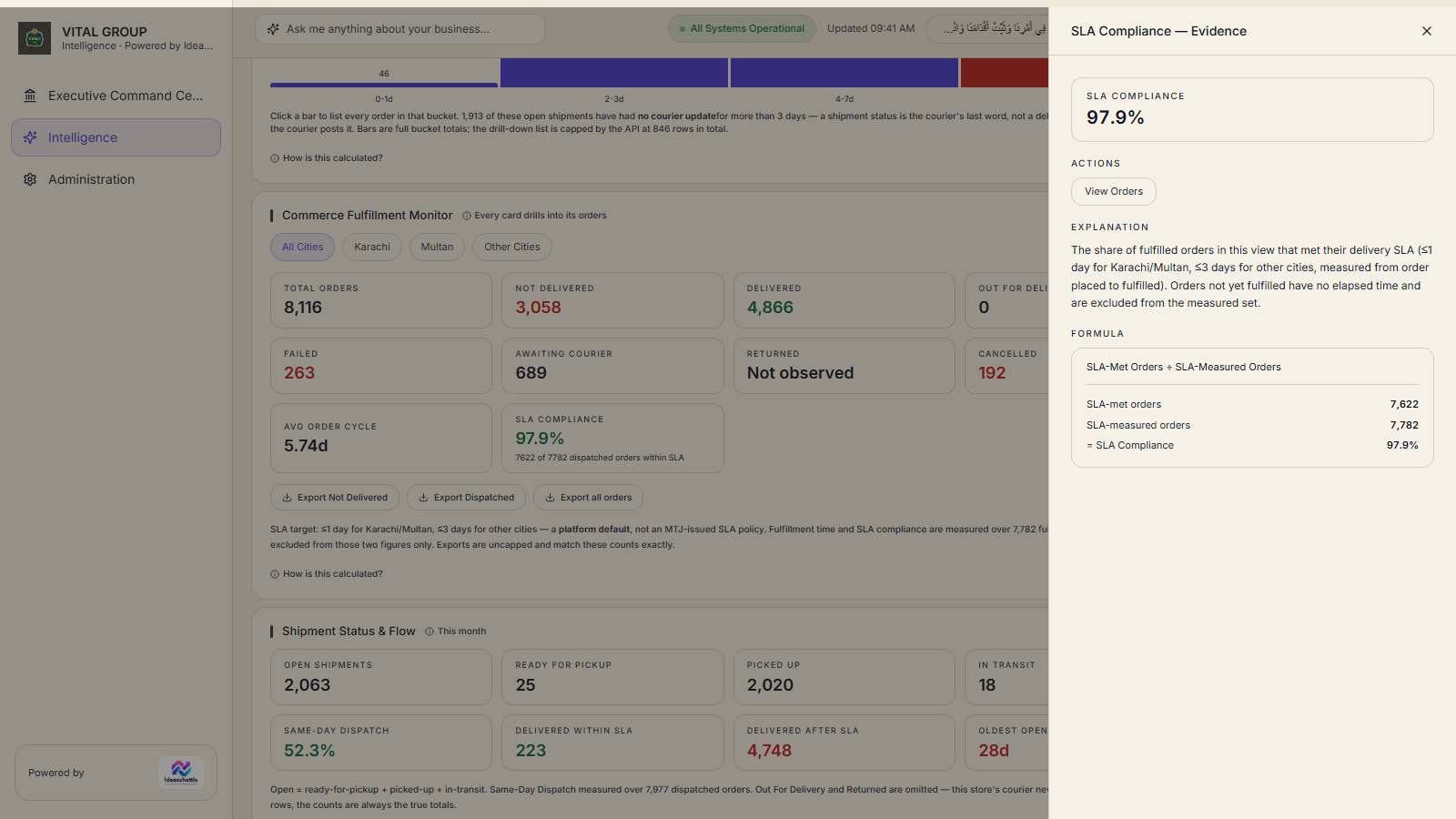
- SLA — stated as a fraction ("dispatched orders within SLA"), by city.
- Processing time — total elapsed time beside operational processing time (business hours, Mon–Sat), and a delayed-before-pickup flag after 24 hours.
10 · Marketing Intelligence
Marketing Intelligence
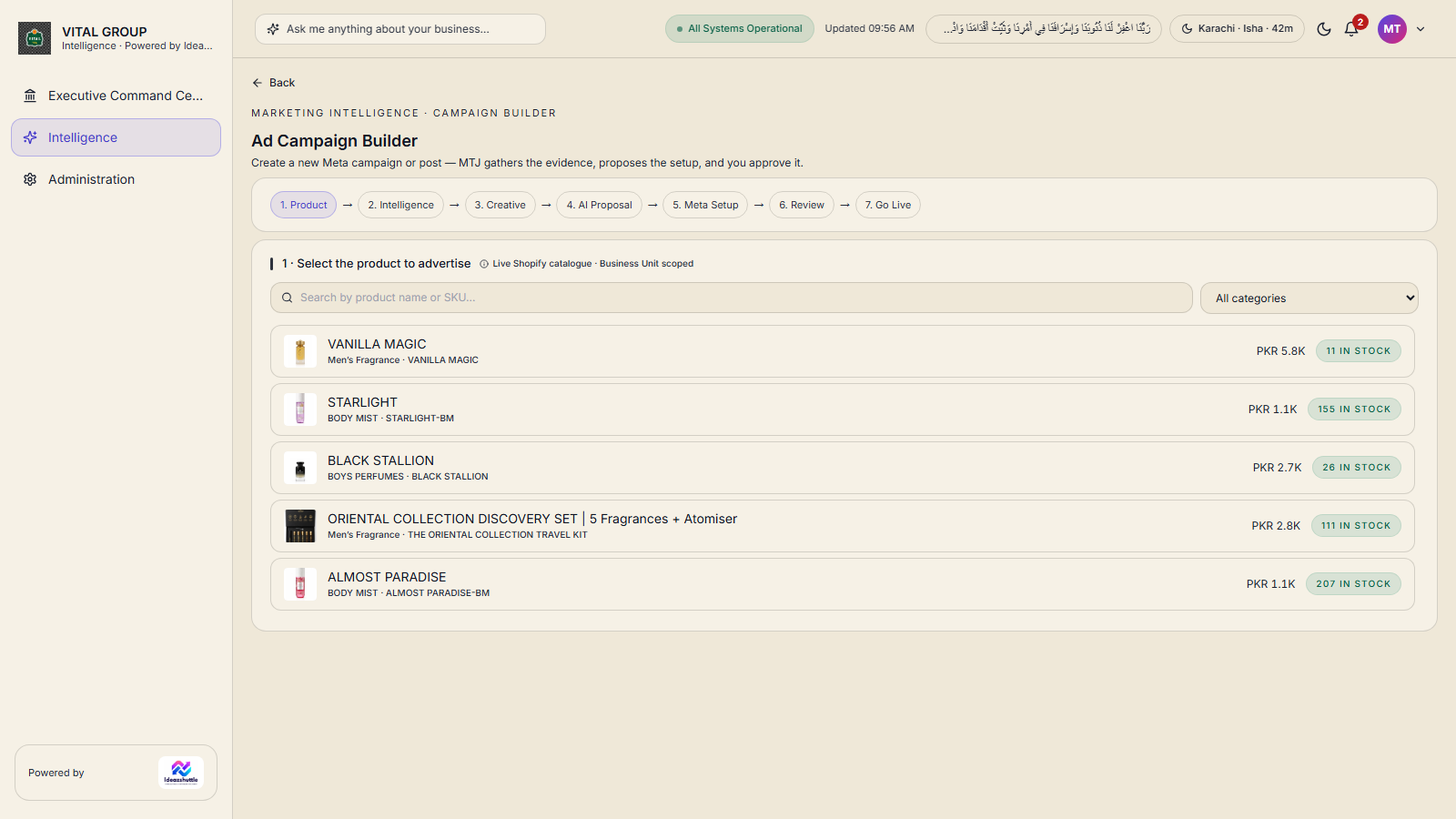
Paid campaign performance from the business's own Meta account, creative review, and a guided Campaign Builder.
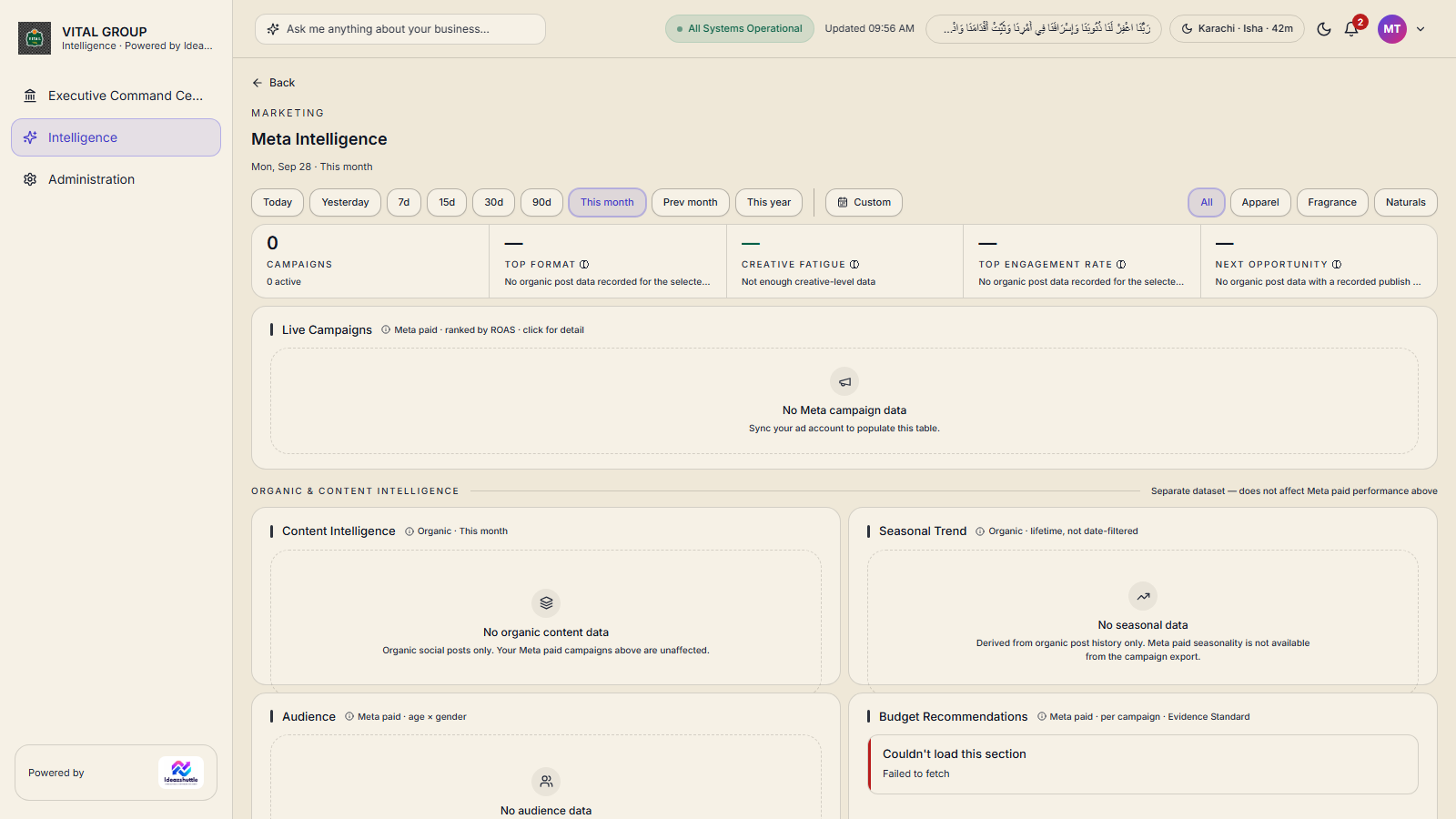
- Meta Intelligence — live campaigns ranked by return on ad spend, audience by age and gender, creative fatigue, budget recommendations with evidence.
- Meta vs Shopify — true performance — Meta's reported revenue reconciled against what Shopify actually recorded.
- Marketing Intelligence — strongest and weakest creatives, a Creative Opportunity Score, weekly and monthly reports, recommended experiments.
- Campaign Builder — seven steps from product to go-live; the system proposes, the user approves.
- Competitor information — competitor master and storefront product tracking with change events and export.
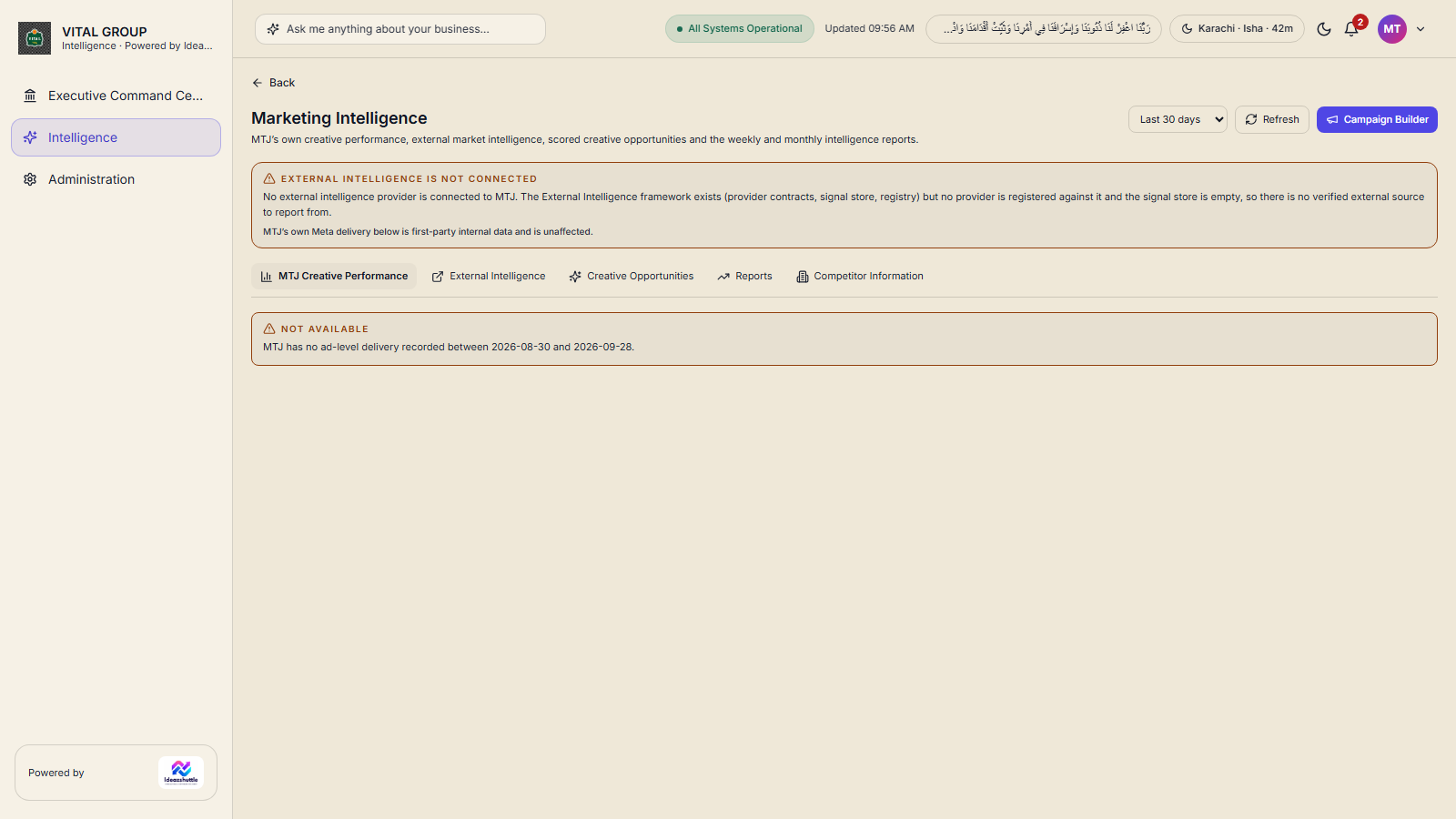
External market and trend intelligence is not connected; the application says so on screen rather than filling the gap. Competitor social activity is not collected.
11 · Operations & administration
Operations & Administration
The working layer: alerts that are owned and approved, approval queues, an assistant that answers from the data, and the controls that keep access safe.
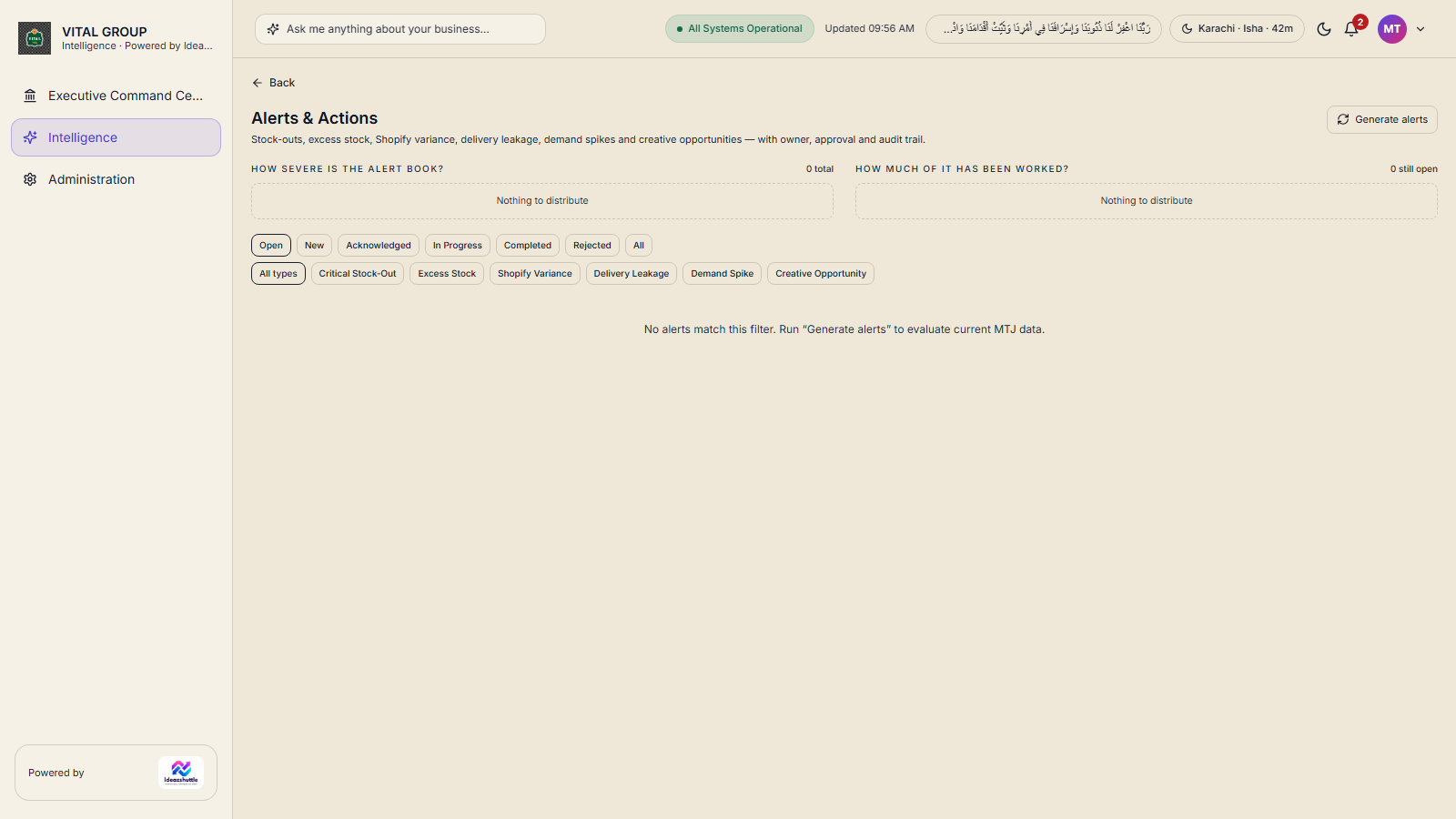
- Alerts & Actions — critical stock-out, excess stock, Shopify variance, delivery leakage, demand spike and creative opportunity, each with owner, business impact, recommended action, evidence and an audit trail.
- Approval queues — stock transfer recommendations and alerts move through review, approval or rejection.
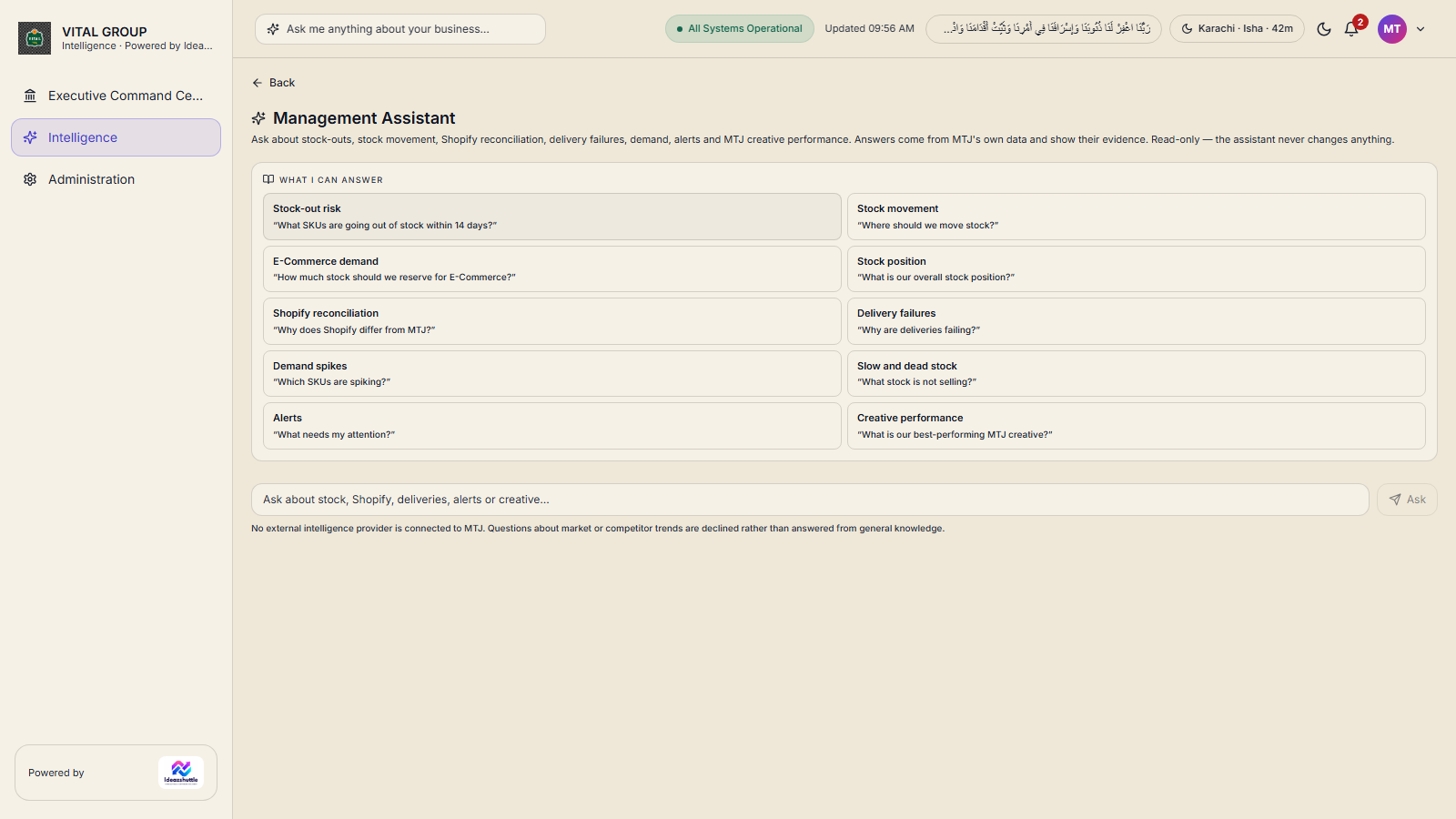
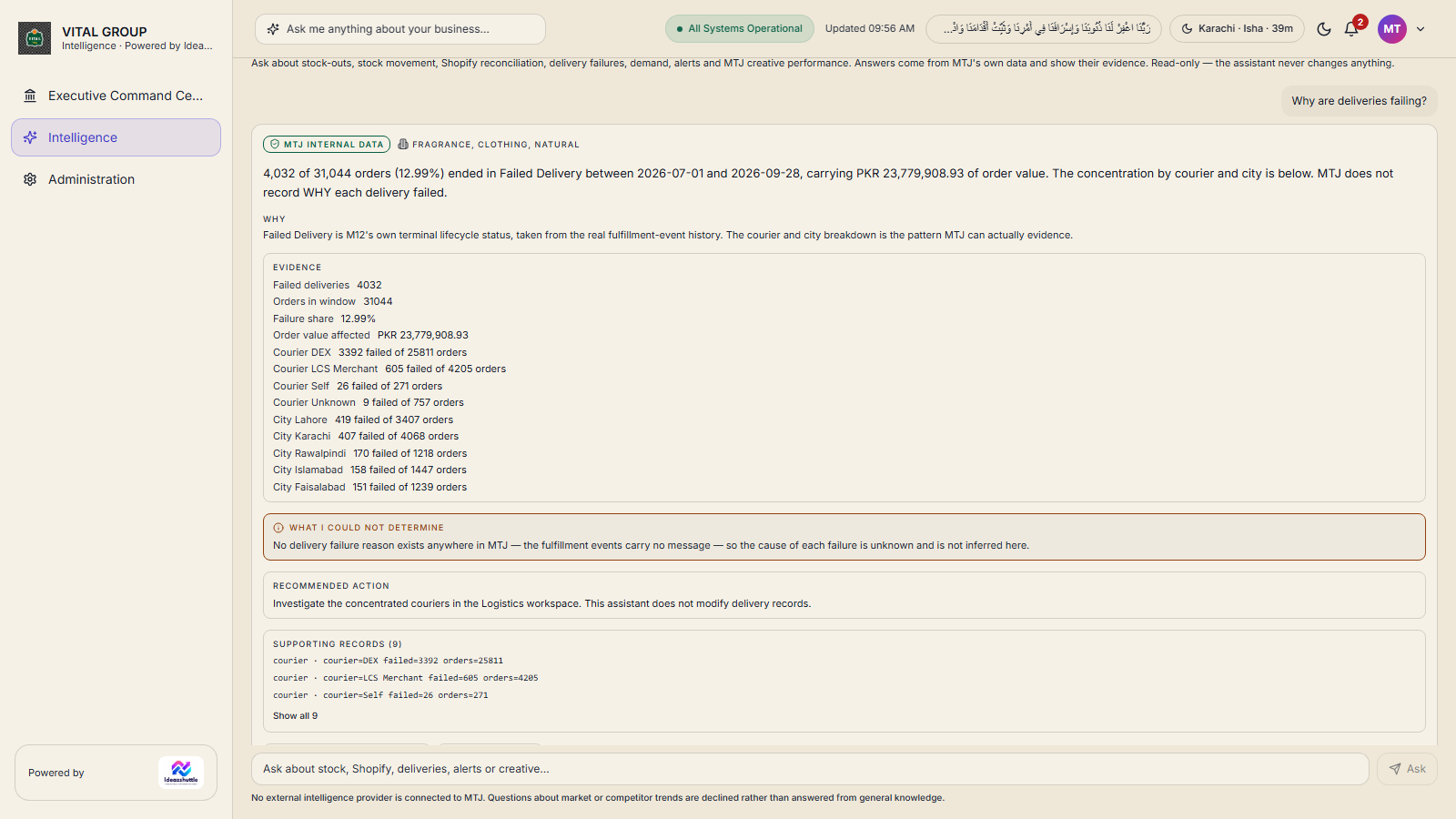
- Management Assistant — plain-language questions about stock, deliveries, reconciliation, alerts and creatives; read-only, every answer with its evidence.
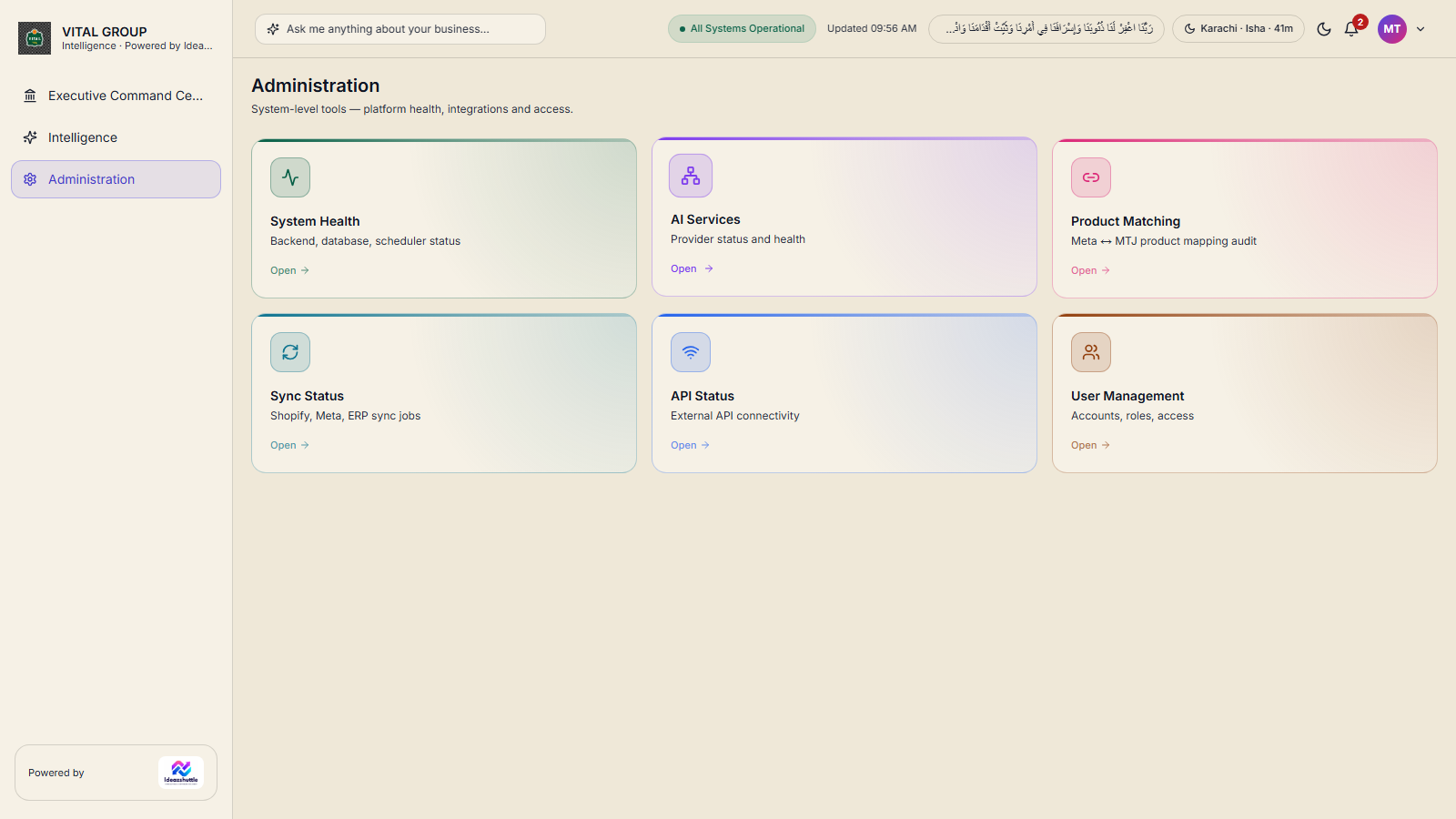
- Administration — system health, sync status, API status, AI services, product matching, user management and roles & permissions.
- Access control — page-level permissions per role, business-unit scoping per user, self-service password change.
There is no separate workforce or HR module in the current application; this section covers the operational and administrative capabilities that exist today.
13 · Decision support
From data to decision
Business Intelligence supports decisions. It does not make them. People approve, reject and act; the system shows the evidence.
Reading the Command Center
- Business status — one sentence, for example "Retail remained the primary revenue channel… 9 of 52 retail outlets recorded no sales."
- Retail · GTech ERP and Online · Shopify headlines, each with an evidence link.
- GTech by location — Retail Shop, Kiosk, Wholesale, Online (ECOM).
- Business Performance Trend — daily, enterprise-wide. Business Mix — Retail, Wholesale, Online shares of the period total.
- GTech ERP strip — revenue, orders, sales locations with and without sales, sales locations out of stock, warehouses with stock issues; sync times and data-through date stated.
- Shopify Commerce strip — net sales, orders, customers, average order value, returns.
- Meta Performance strip — spend, revenue, ROAS, purchases, people reached, CTR.
Decisions, health and evidence
- Needs My Decision — ranked executive decisions with business problem, source data, product and last-verified time.
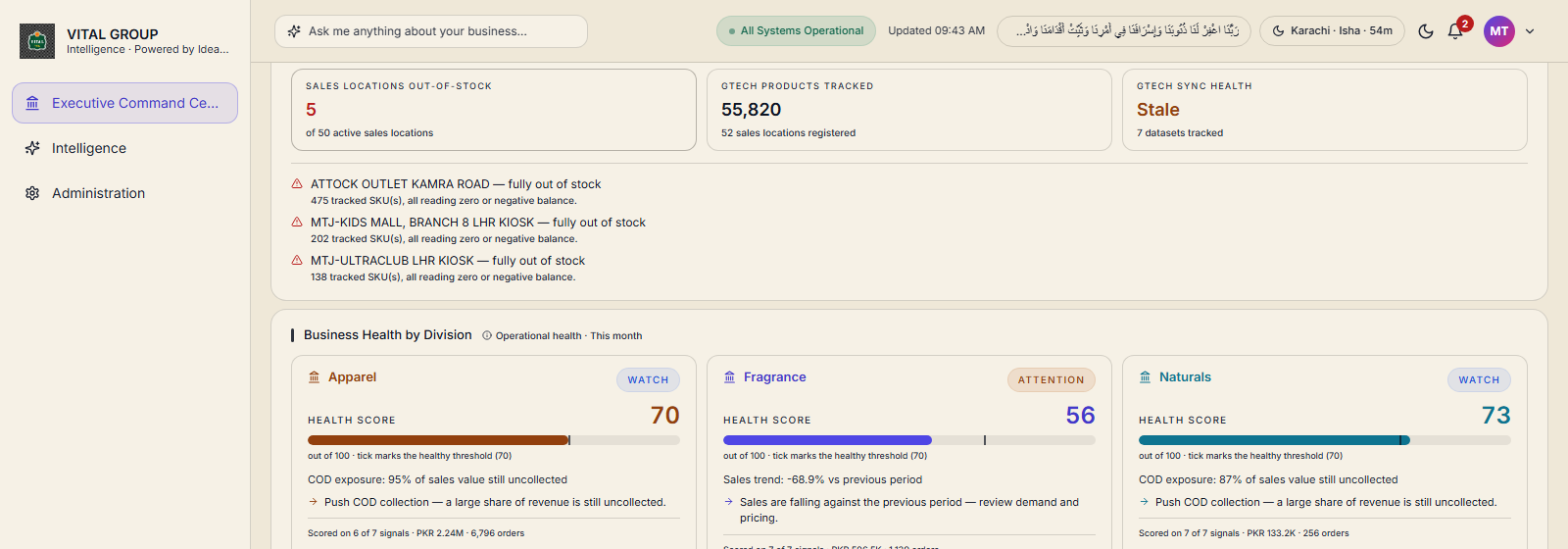
- Business Health by Division — a scored health per business unit with its primary reason.
- Opportunities (where to push) and Risks (what to defend), each opening its evidence.
- GTech ERP Operational Intelligence — sales locations out of stock, products tracked, sync health.
- Supporting Evidence — analytics and drill-downs behind the page.
- Business Intelligence workspace — Executive Brief (business health, open decisions), What Needs Attention, What Is Doing Well, Needs My Approval, Opportunities, Why It Happened — grouped by Sales, Inventory, Marketing, Customers, Operations and Locations.
Needs My Decision, Opportunities and Risks are computed by the Executive Decision Engine from the live data; they could not be captured on the presentation environment (see README) and are described here rather than shown.
GTech ERP — Sales Operations
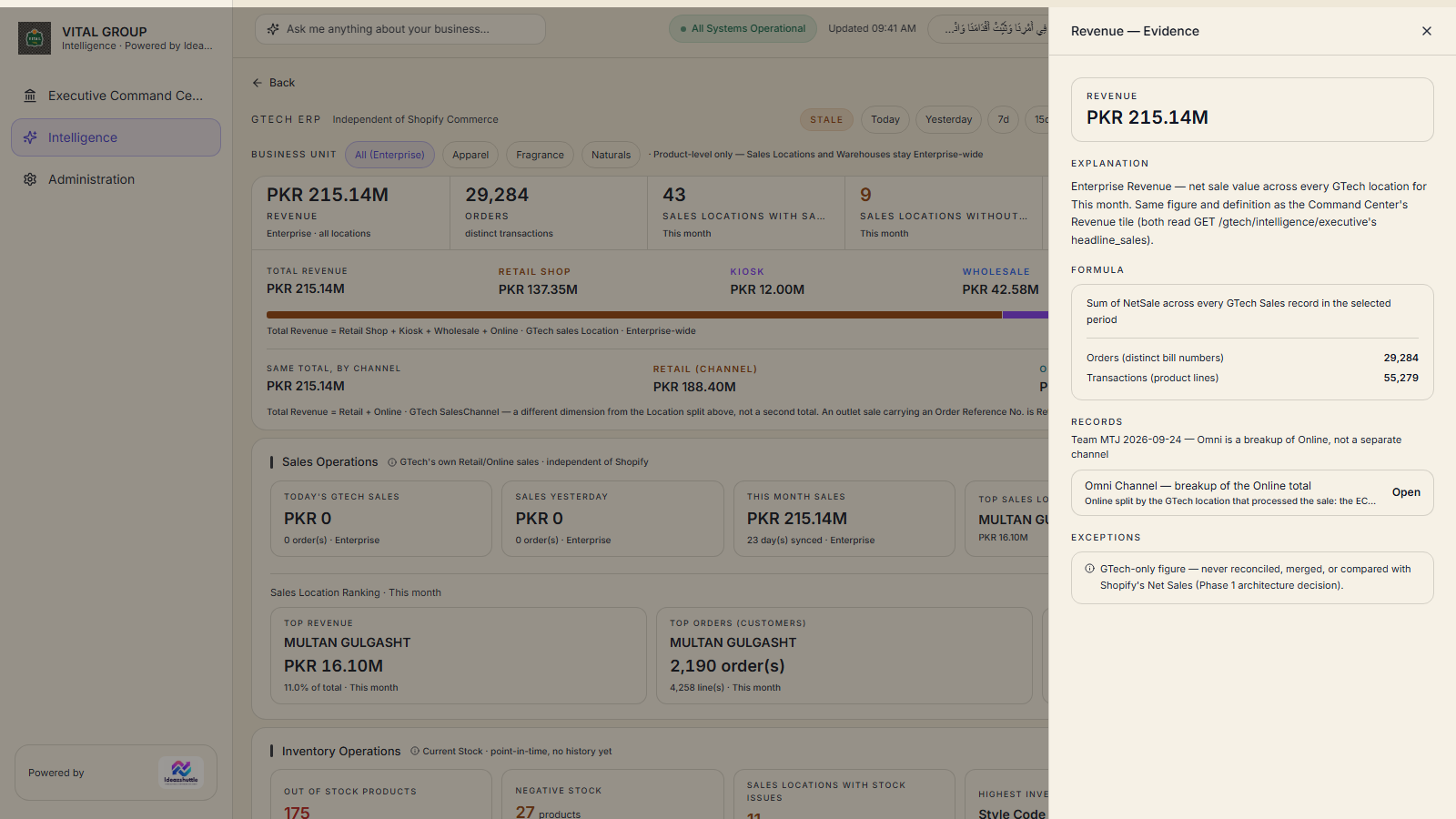
- Sales KPIs — revenue, orders (distinct transactions), sales locations with and without sales.
- Revenue by location type — Retail Shop, Kiosk, Wholesale, Online. By channel — Retail, Online (an outlet sale carrying an order reference is Retail Shop by location and Online by channel; both are labelled).
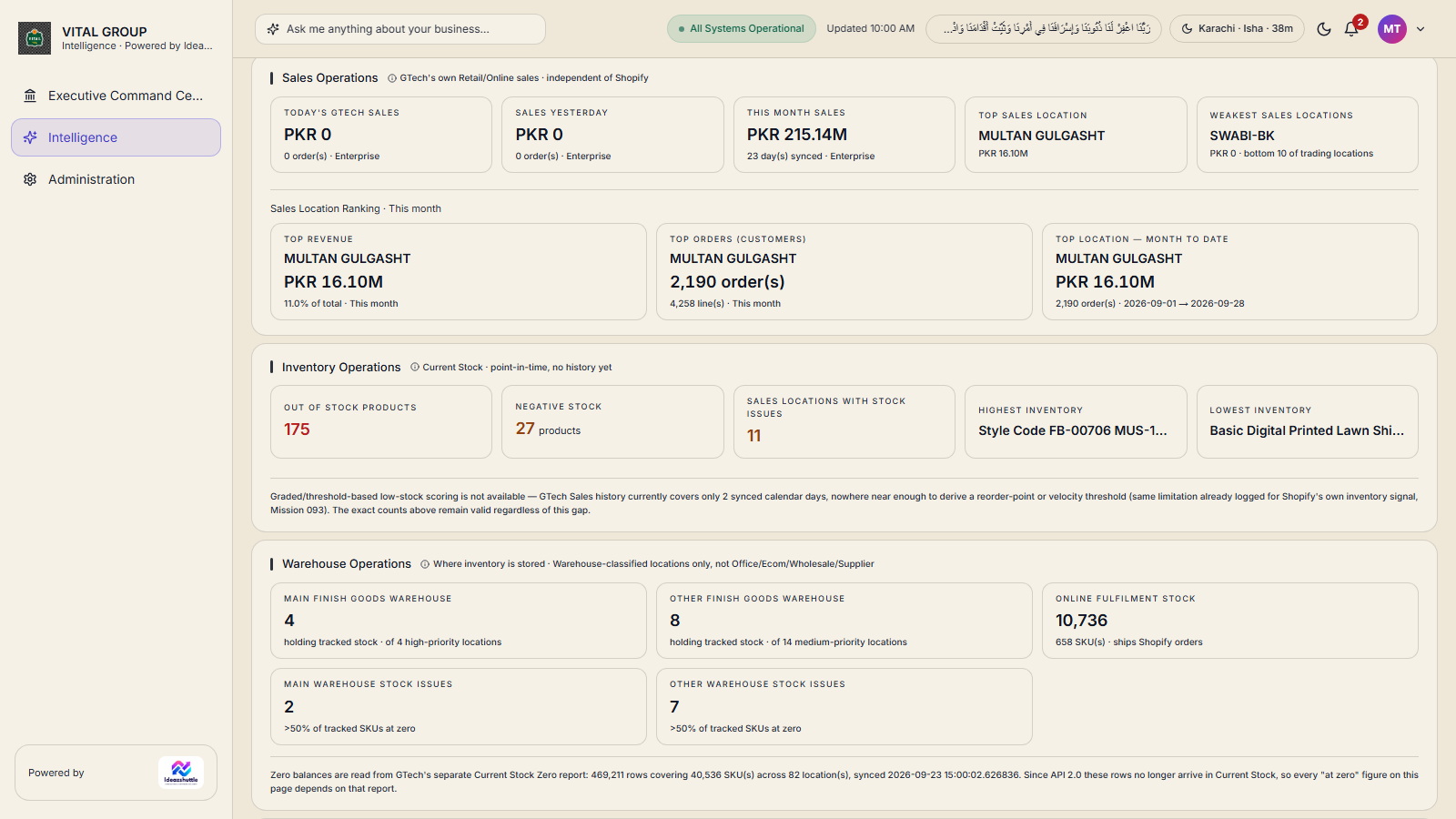
- Sales Operations — today's GTech sales, sales yesterday, this-month sales, top sales location, weakest sales locations, top location month-to-date.
- Sales Location Ranking — top revenue, top orders, drill to any location's detail and its records.
- Business Unit filter at product level: Apparel, Fragrance, Naturals.
- Online = ECOM + Omni — the online total broken down by the location that processed the sale, with export.
Business Reporting
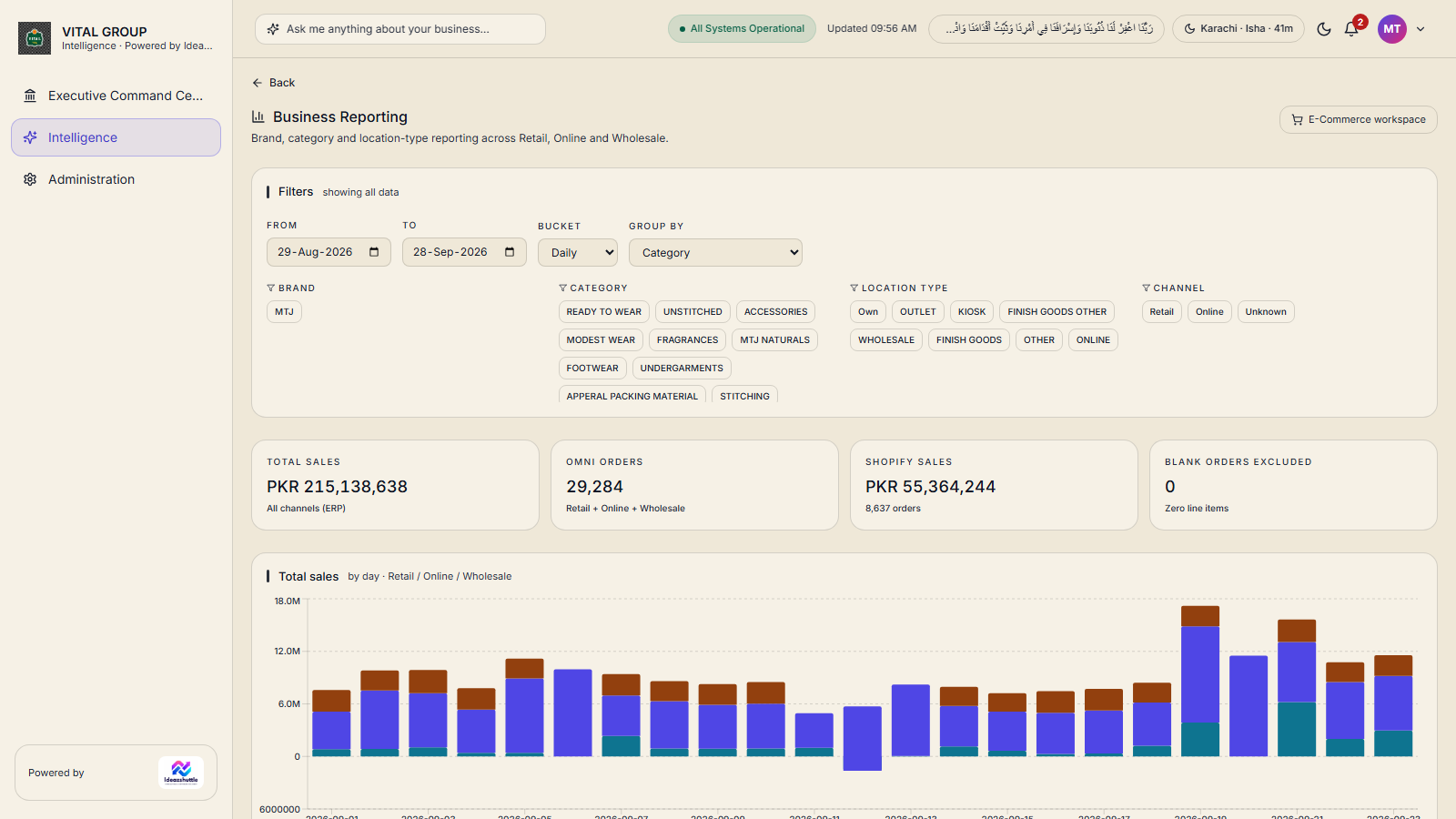
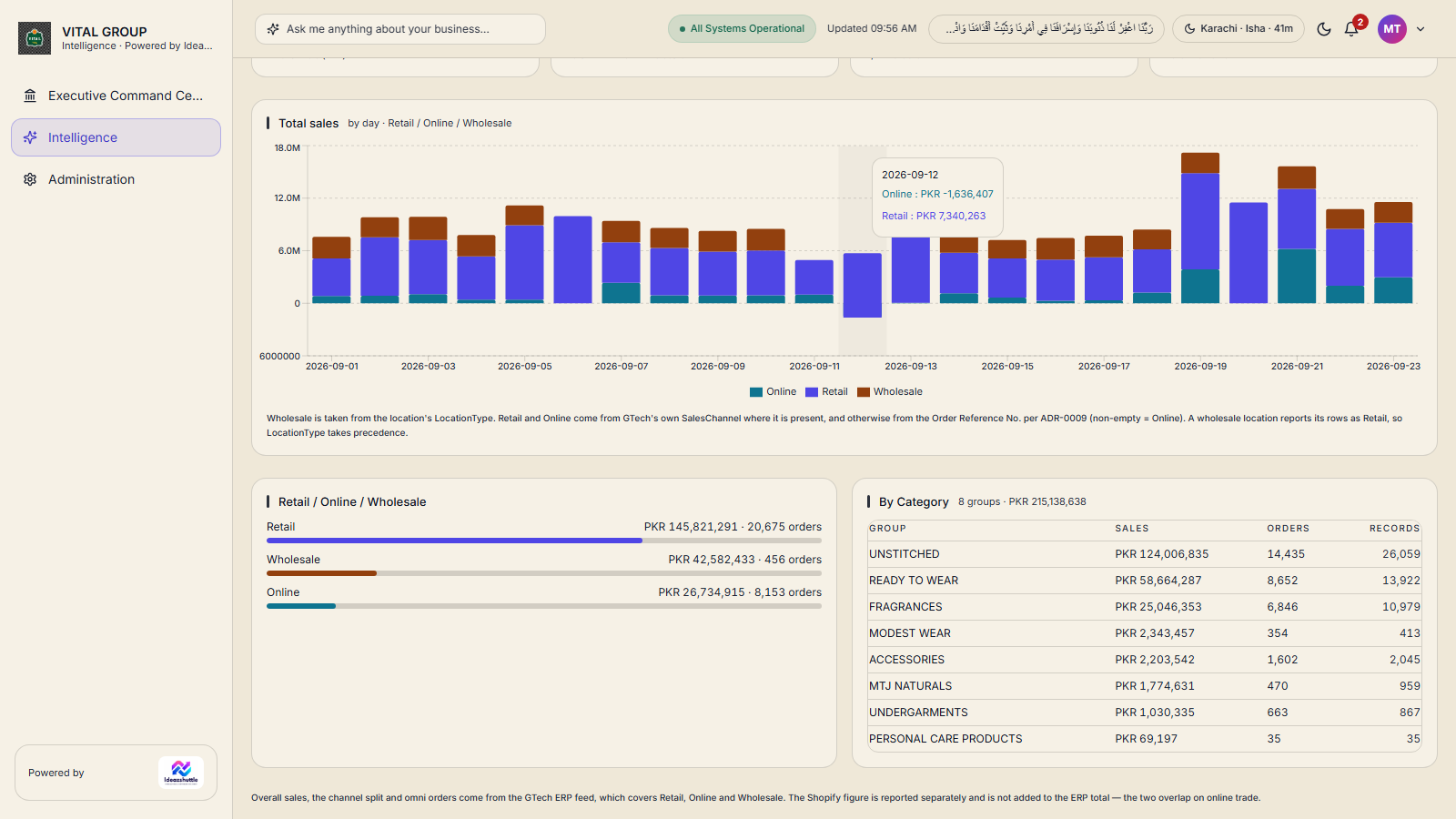
- Filters — from / to dates; daily, weekly or monthly buckets; group by brand, category, location type or channel (Retail / Online / Wholesale).
- Headline figures — total sales (all channels, ERP), omni orders (Retail + Online + Wholesale), Shopify sales and orders, blank orders excluded.
- Total sales by day — Retail, Online and Wholesale stacked over the period.
- Breakdowns — Retail / Online / Wholesale with revenue and order counts; category and location-type tables.
- Wholesale is taken from the location type; Retail and Online from GTech's own sales channel.
Physical Retail & exports
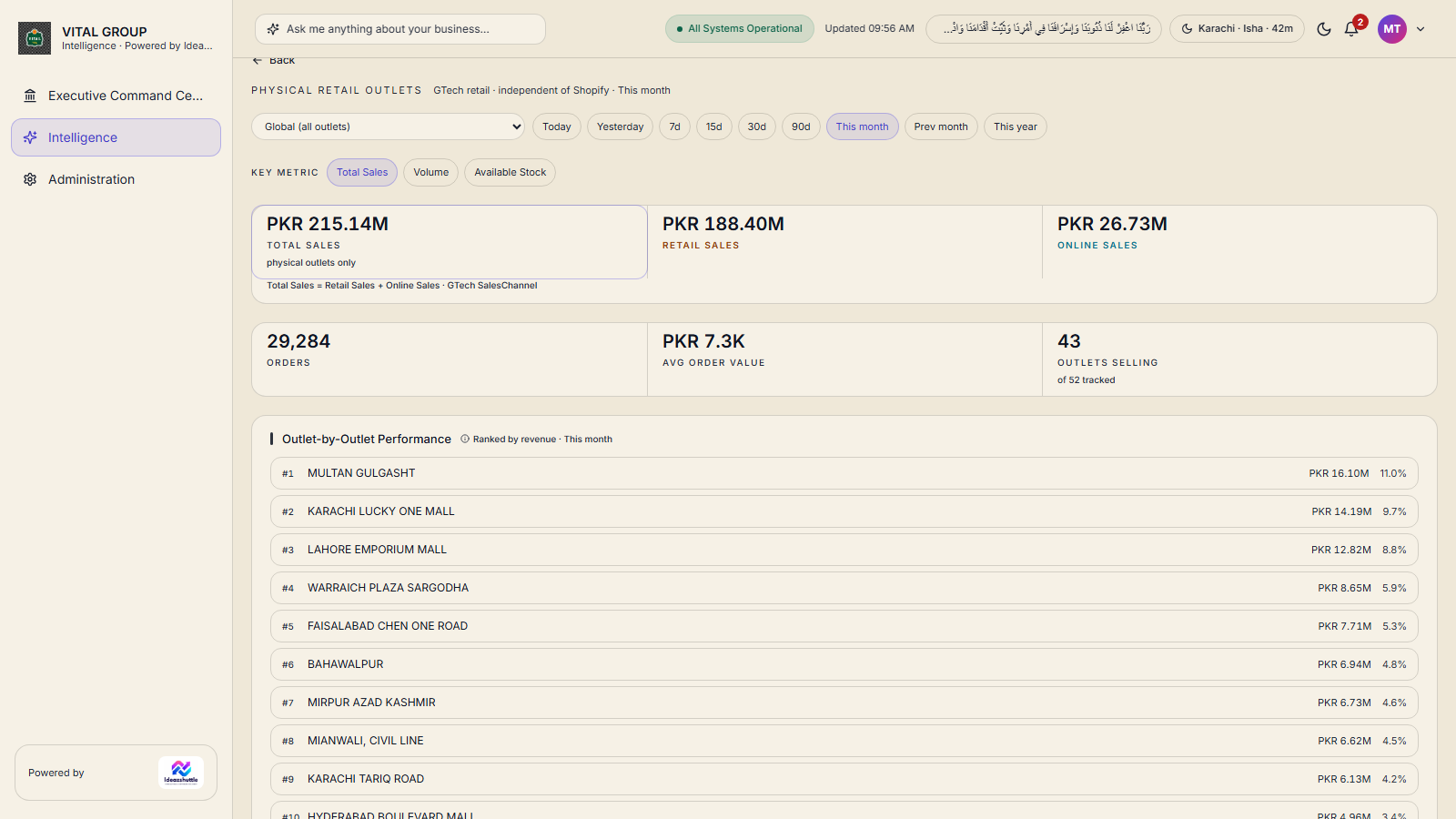
- Physical Retail Outlets — global view or any single outlet or kiosk; outlet-by-outlet performance. (Foot-traffic / walk-in counts are not recorded by GTech or Shopify; the page says so.)
- Locations — 52 sales locations classified as outlet, kiosk, wholesale or ECOM; closed locations are withheld and disclosed.
- Exports (CSV) — sales for a period, current stock, negative stock, product master, location master, purchase records, product activity, launch status, warehouse stock issues, sales locations active today.
- Data freshness — GTech synchronises three times a day; the page states the last sync and the data-through date.
Stock risk and reorder
- Source toggle — Online (Shopify website stock and sales velocity) or GTech.
- Stock Risk Profile — active products; Critical (under 7 days of cover), Low (under 14), Watch, Healthy (30+), No sales (dead stock), No data; revenue at risk.
- Needs Reorder — ranked by urgency, "reorder N units to restore 30 days of cover", with days of cover, in stock, velocity and revenue at risk.
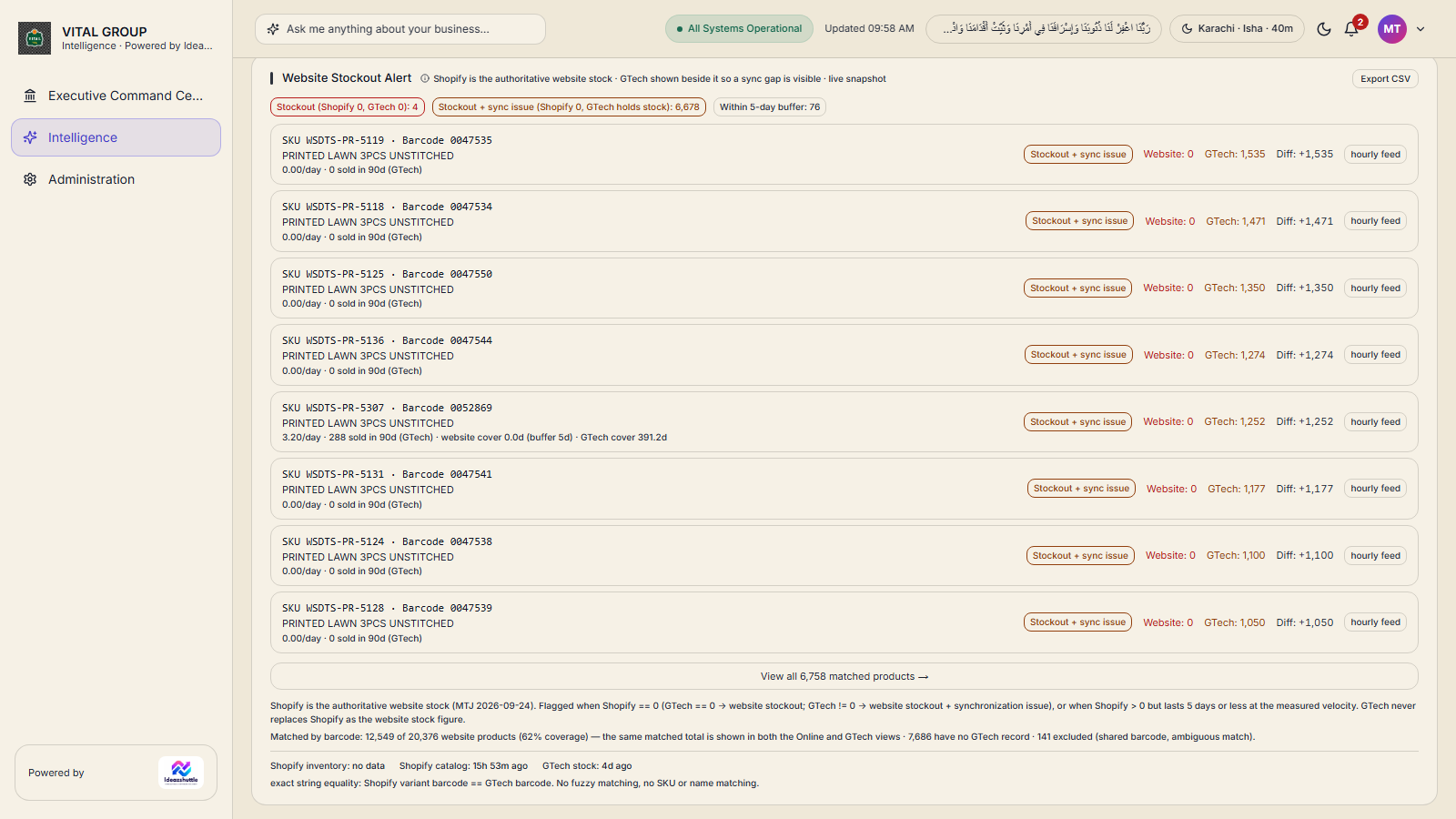
- Website Stockout Alert — Shopify is the authoritative website stock: stock-out (Shopify 0, GTech 0), stock-out with sync issue (Shopify 0, GTech holds stock), and within the 5-day buffer; CSV export.
- ABC Analysis, Category Mix, Fast / Slow / Dead Movers, Demand Intelligence, Dynamic Reorder Alerts.
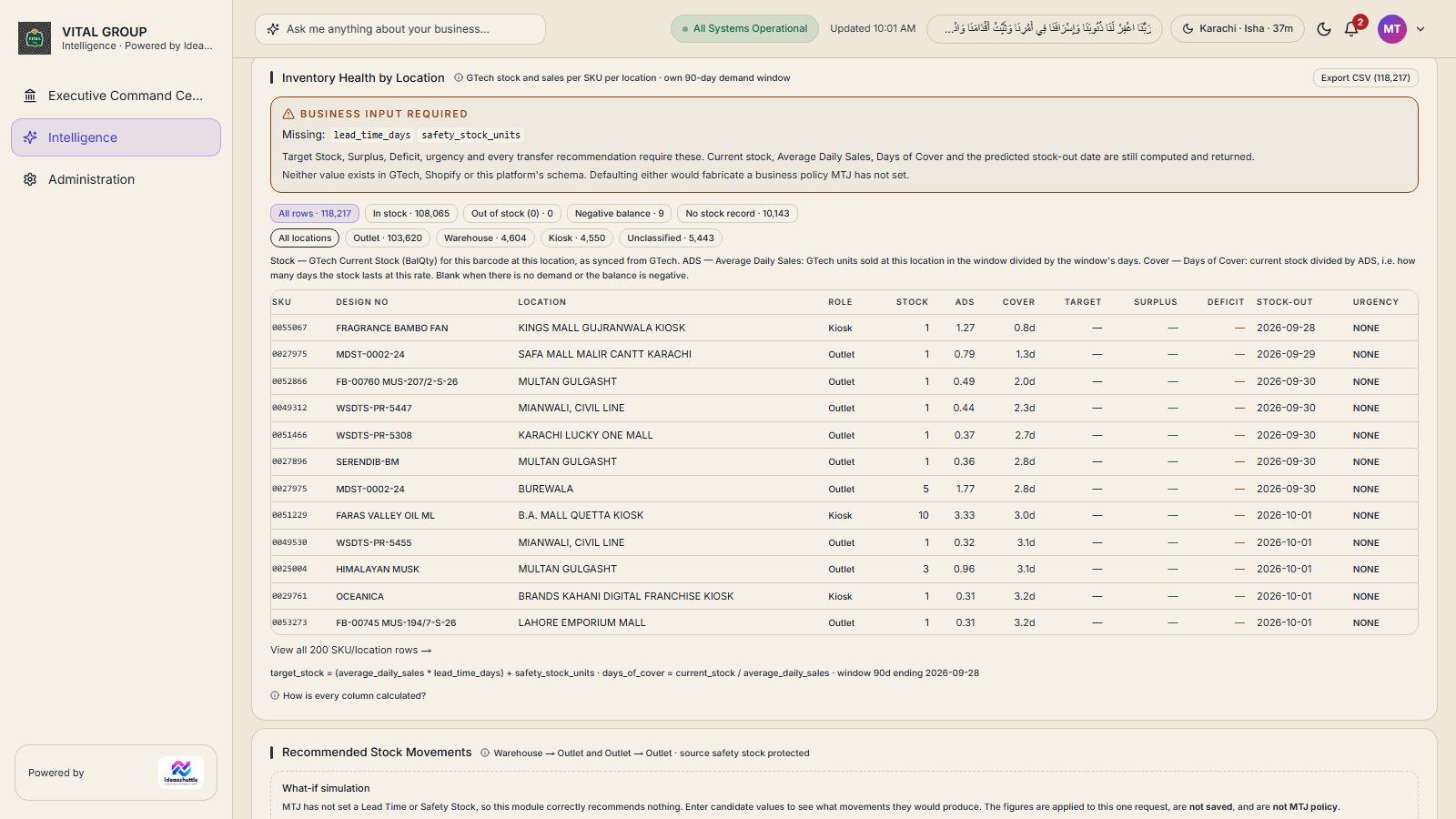
Locations, warehouses and movements
- Inventory Health by Location — every SKU at every location with days of cover; filter by location category and role (warehouse, outlet, kiosk); streamed CSV export.
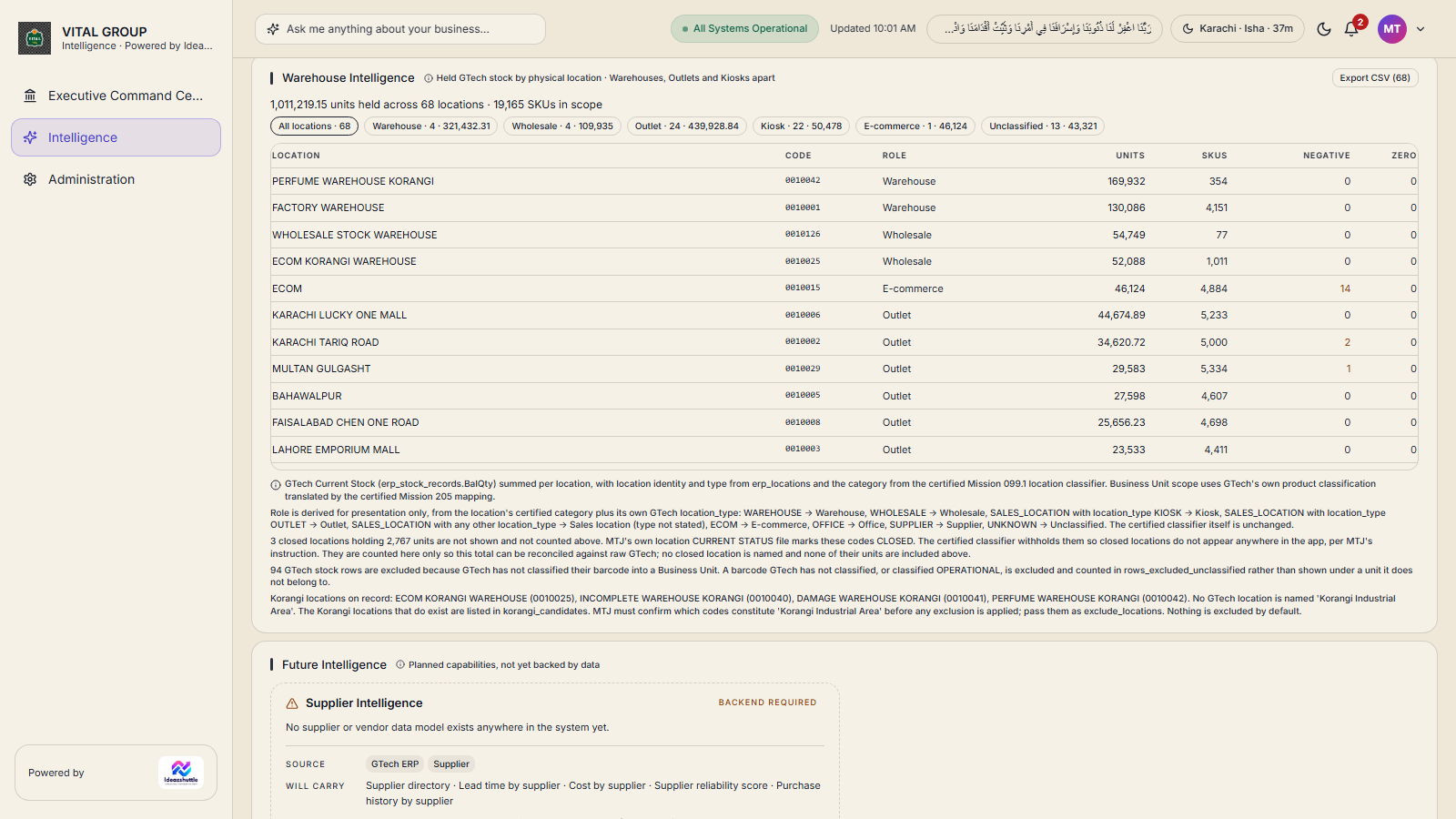
- Warehouse Intelligence — per-location stock with drill-down to the products held; closed locations withheld and disclosed.
- Recommended Stock Movements — source and destination ranking with exact transfer quantities, and a clearly labelled what-if simulation that saves nothing.
- Transfer Approval Queue — recommended → approved → in transfer → received → completed, or rejected; business-unit scoped; every transition recorded.
- OOS Forecast & Replenishment Planner — see Forecasting & Planning.
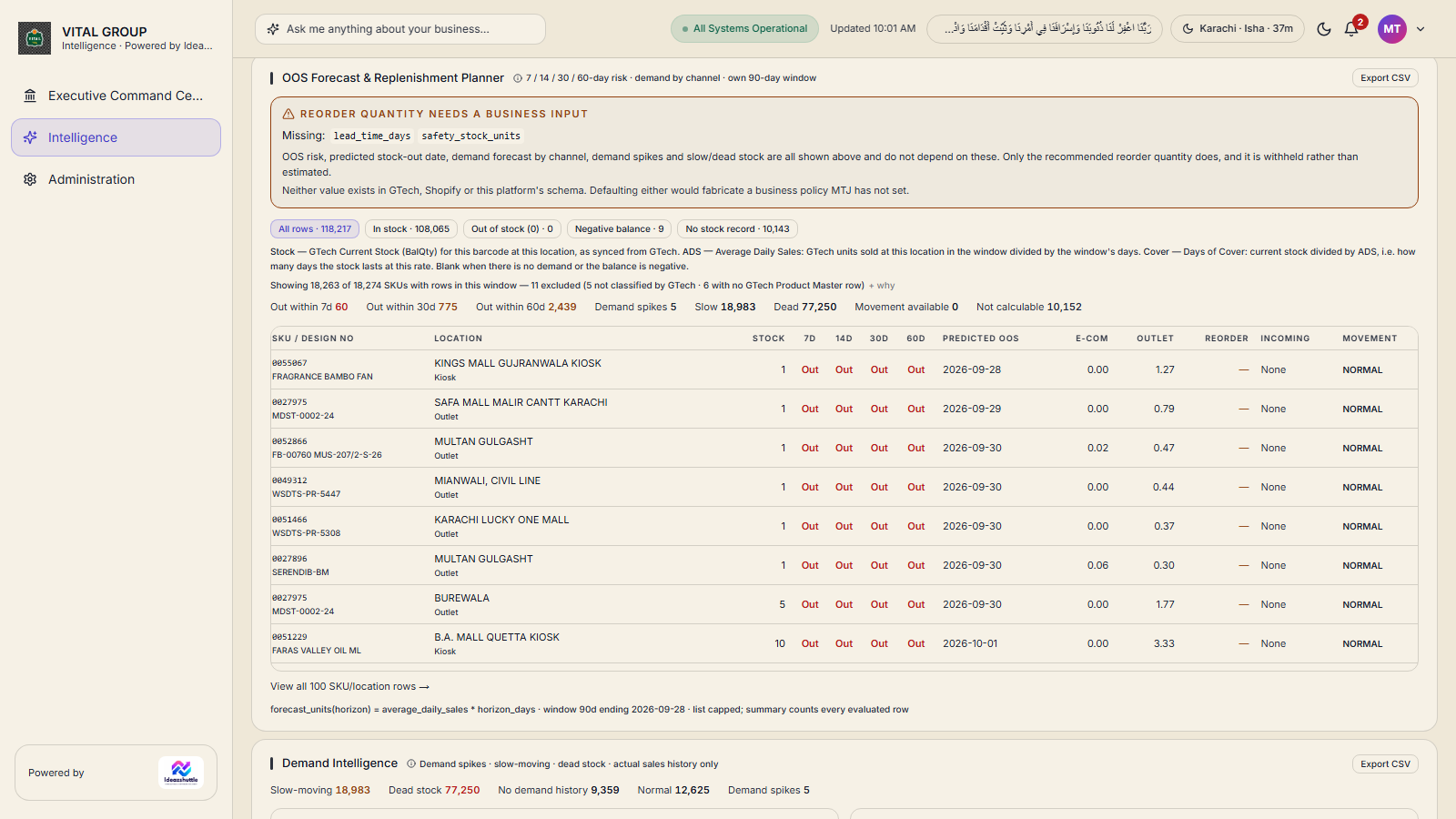
Target stock, surplus and deficit require lead time and safety stock, which the business has not yet defined; those fields show as not computable rather than as invented numbers.
GTech stock position
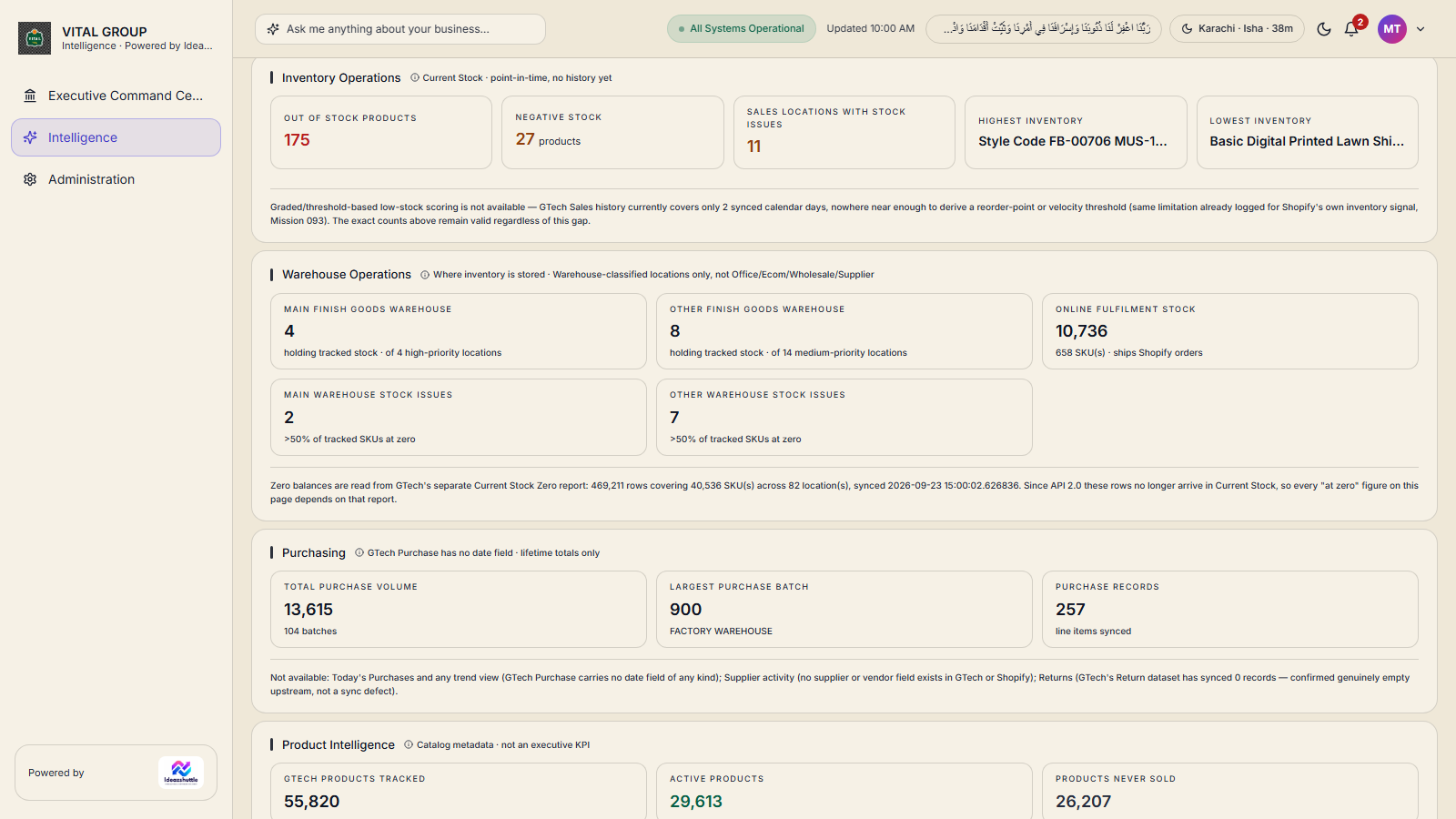
- Inventory Operations (GTech ERP workspace) — out-of-stock products, negative stock (products and records), sales locations with stock issues, highest and lowest inventory.
- Warehouse Operations — main and other finish-goods warehouses holding tracked stock, online fulfilment stock, warehouses with more than half their SKUs at zero.
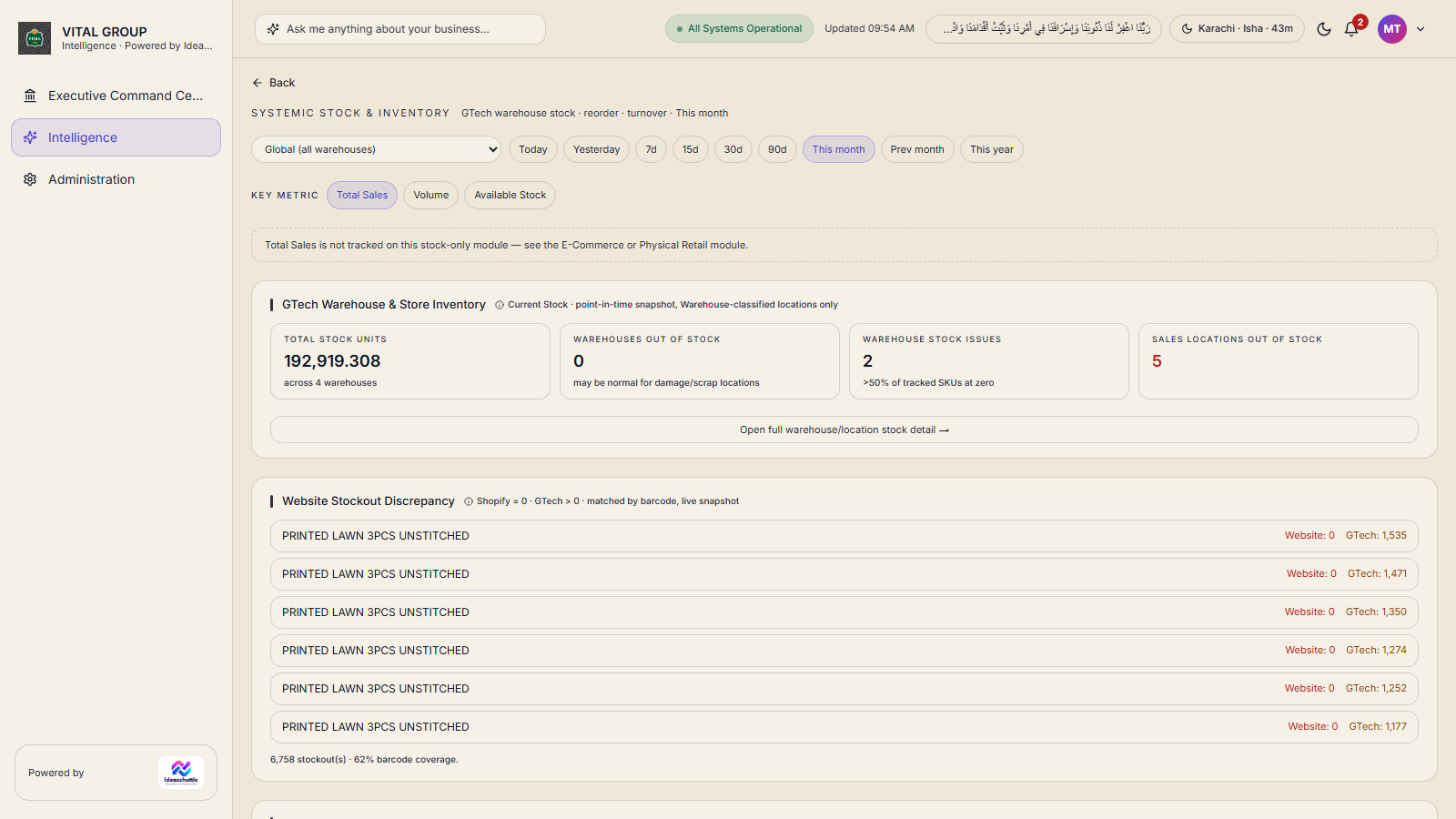
- Systemic Stock & Inventory — total stock units across warehouses, website stock-out discrepancy (website 0, GTech > 0, matched by barcode), reorder alerts, stock aging, dead stock and low turnover.
- Negative stock — every negative record traceable to its product, location, business unit and the GTech snapshot it came from.
Source GTech current stock and zero-stock reports, product and location masters. Calculated classifications, cover, issues and discrepancies.
Live Commerce (Shopify)
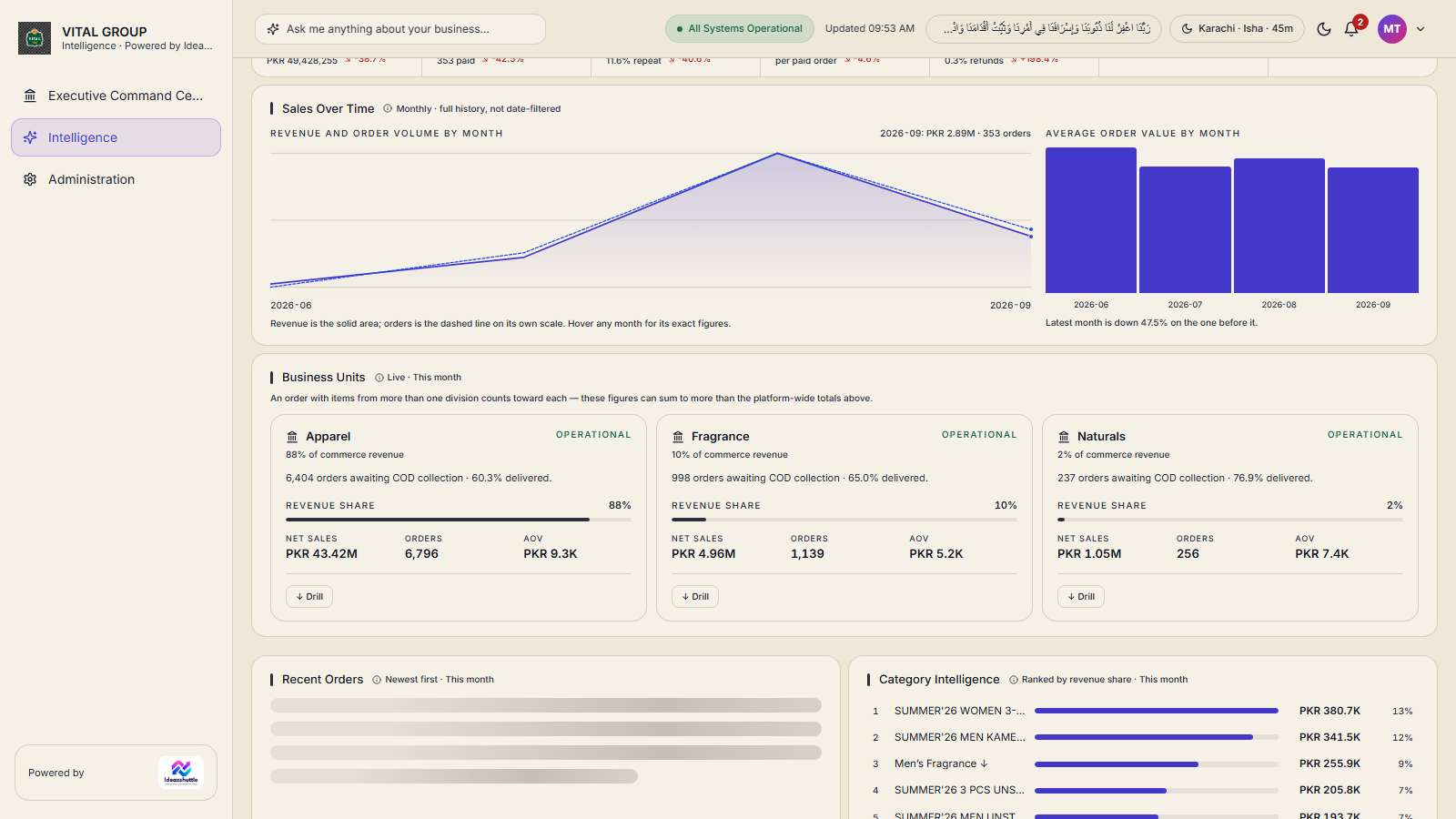
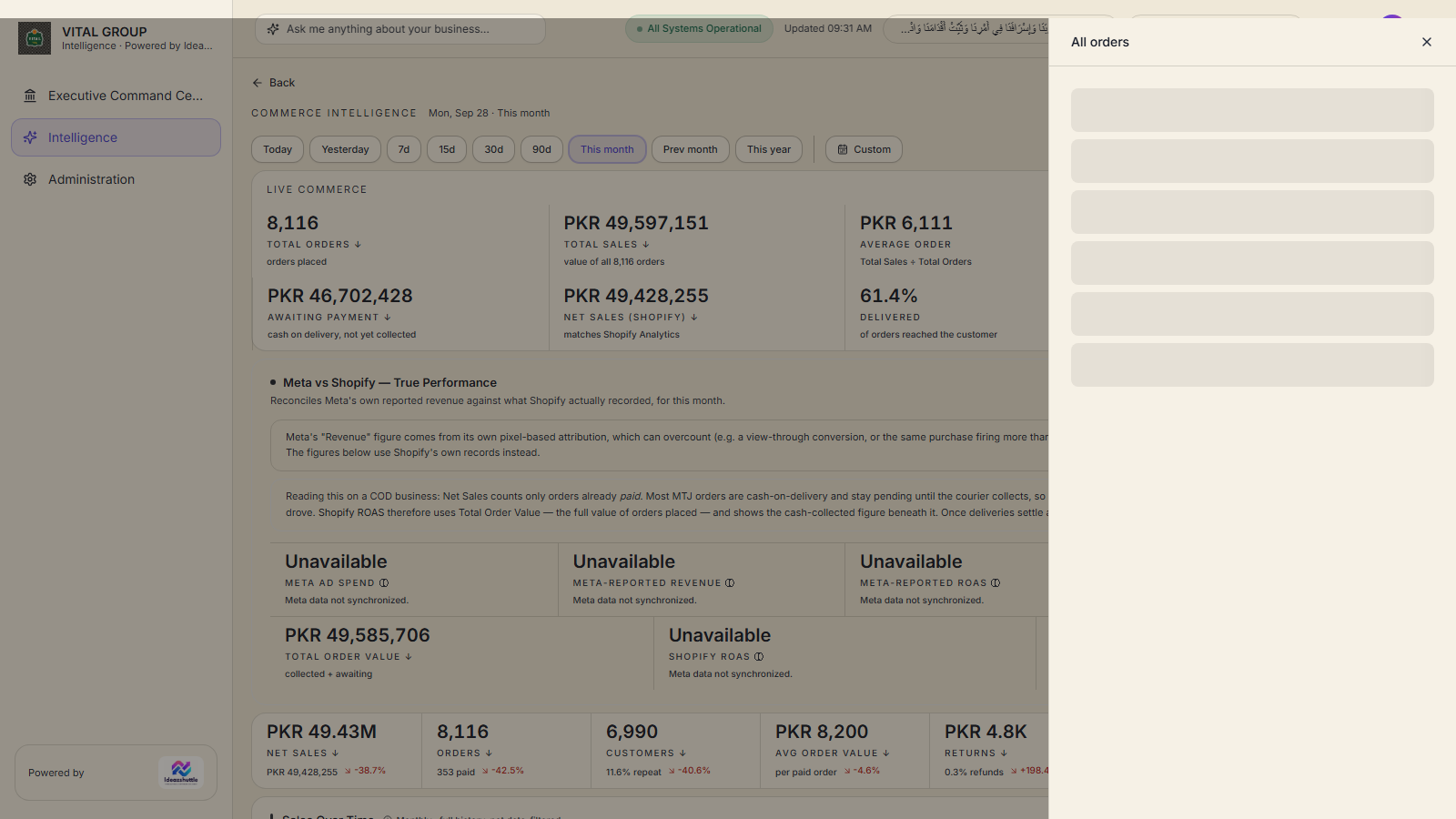
- Cash-on-delivery model — total orders, total sales, average order, money received, awaiting payment (cash on delivery not yet collected), net sales (matches Shopify Analytics), delivered %, paid upfront.
- Meta vs Shopify — true performance — Meta's reported revenue and ROAS against money collected and total order value in Shopify.
- Sales Over Time — revenue and orders by month. Orders by Status and Fulfilment Performance.
- Customer Intelligence — customers, repeat rate, order history per customer. Product and Category Intelligence, Recent Orders, Lost Sales, Inventory Movement.
- Every tile opens its evidence, down to the order and its line items.
E-Commerce detail and reconciliation
- E-Commerce Category — net sales, orders, average order value, paid upfront, delivery rate, returns; category breakdown by category or SKU.
- Customer Retention — repeat buyers, repeat rate, total customers, with the real customer records behind each figure.
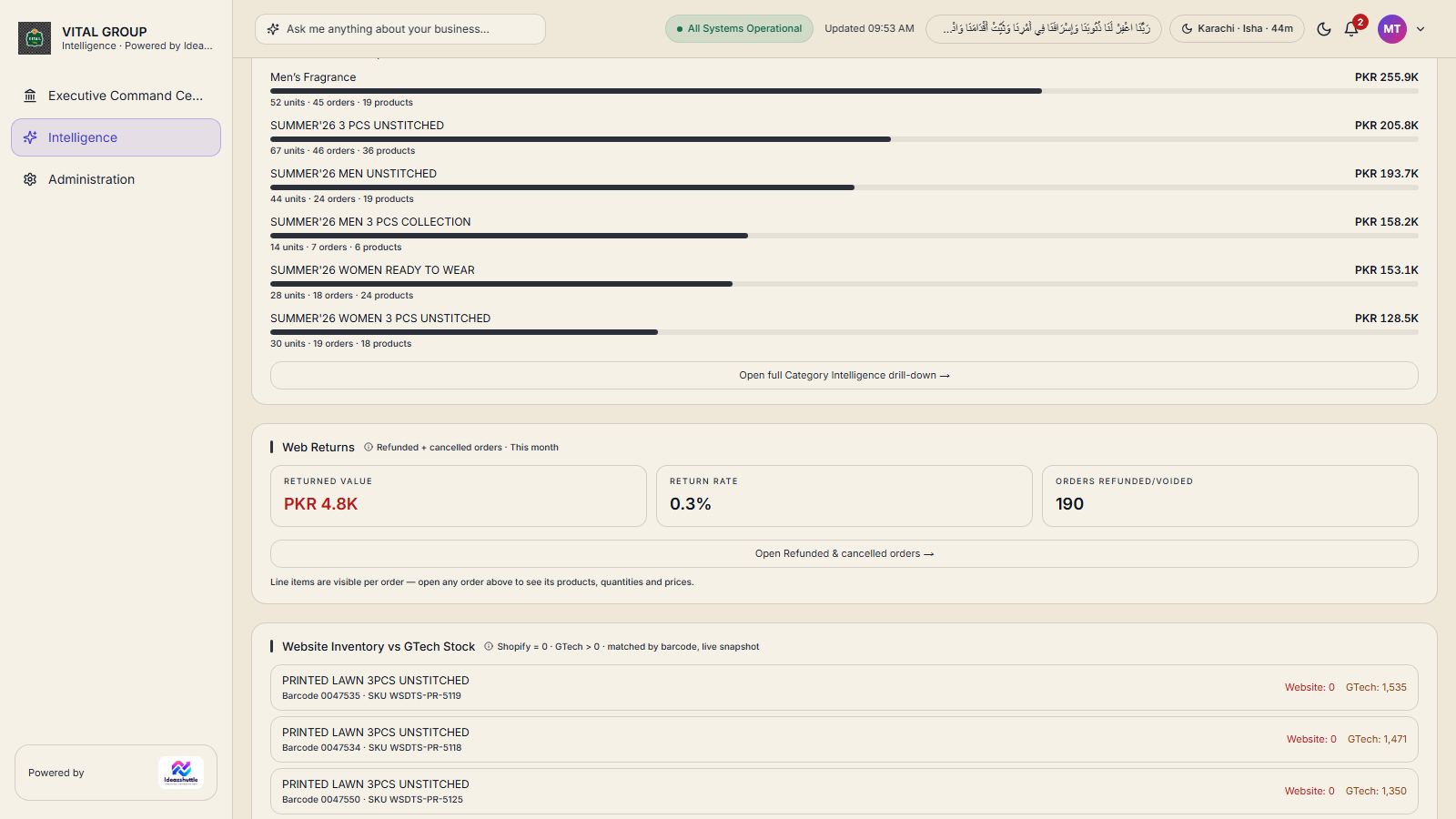
- Web Returns — refunded and cancelled orders, returned value and return rate.
- Website Inventory vs GTech Stock — products at zero on the website while GTech holds stock, matched by barcode.
- Order-Level Reconciliation — the live Shopify store compared with the stored copy, order by order.
- Omni — in the GTech ECOM view, the online total is broken down into ECOM and Omni locations, reconciled and exportable.
Lifecycle, status and aging
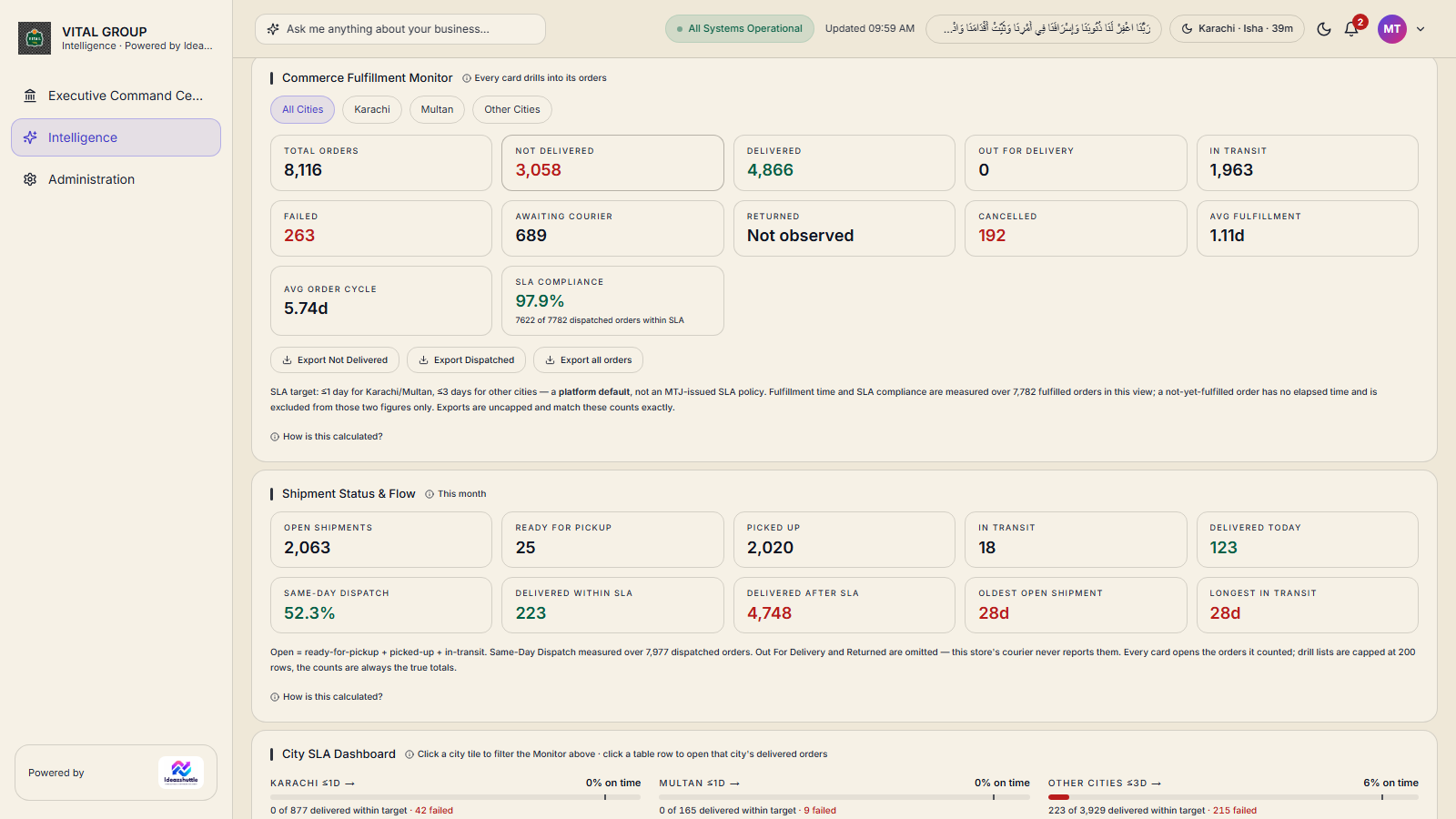
- Delivery lifecycle — Orders Received, Confirmed, Ready for Pickup, Picked Up, In Transit, Delivered, Failed Delivery, Cancelled; mutually exclusive, every order in exactly one stage. Picked Up is the dispatch moment.
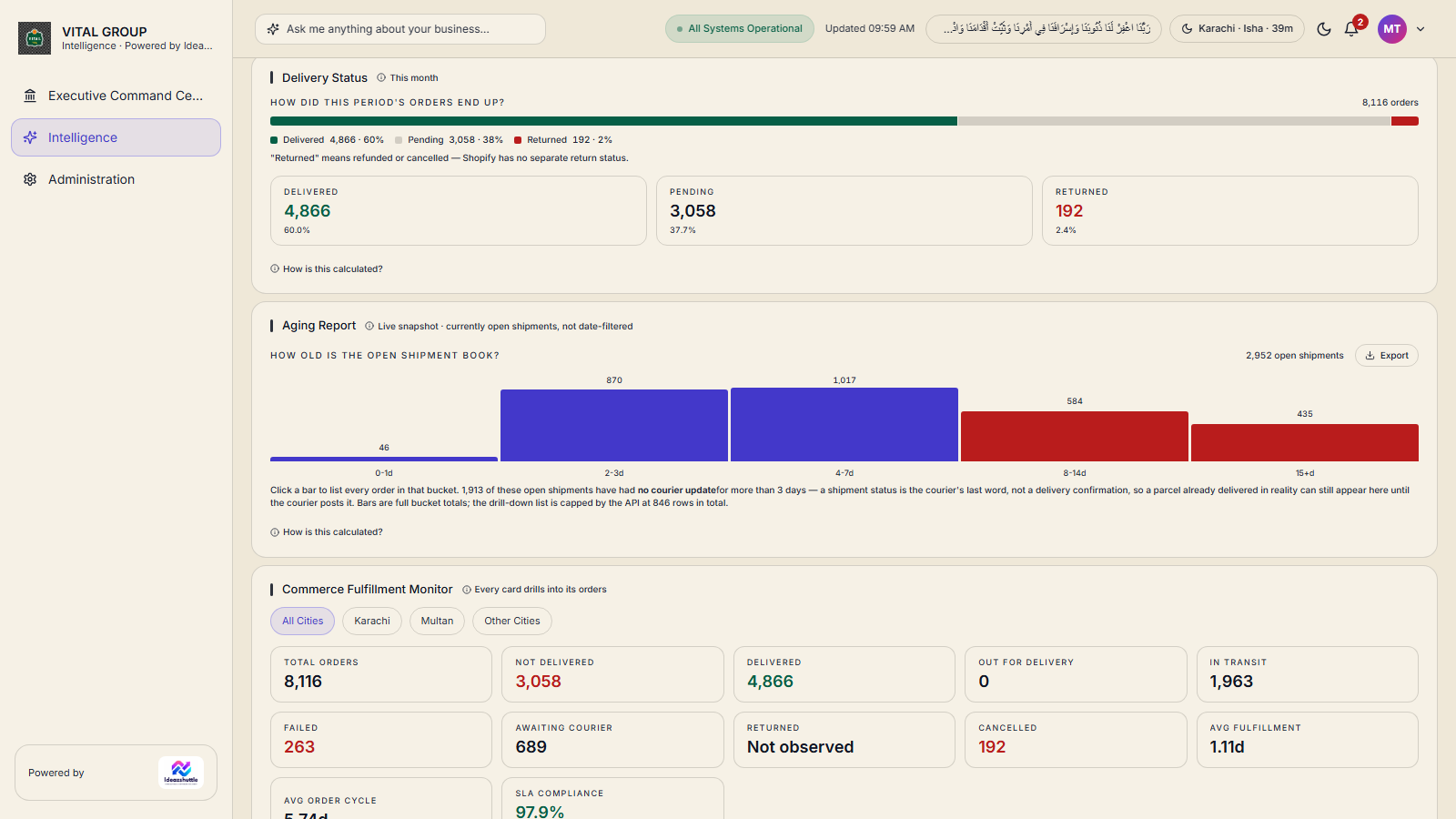
- Delivery Status — Delivered, Pending, Returned, with each definition stated on screen.
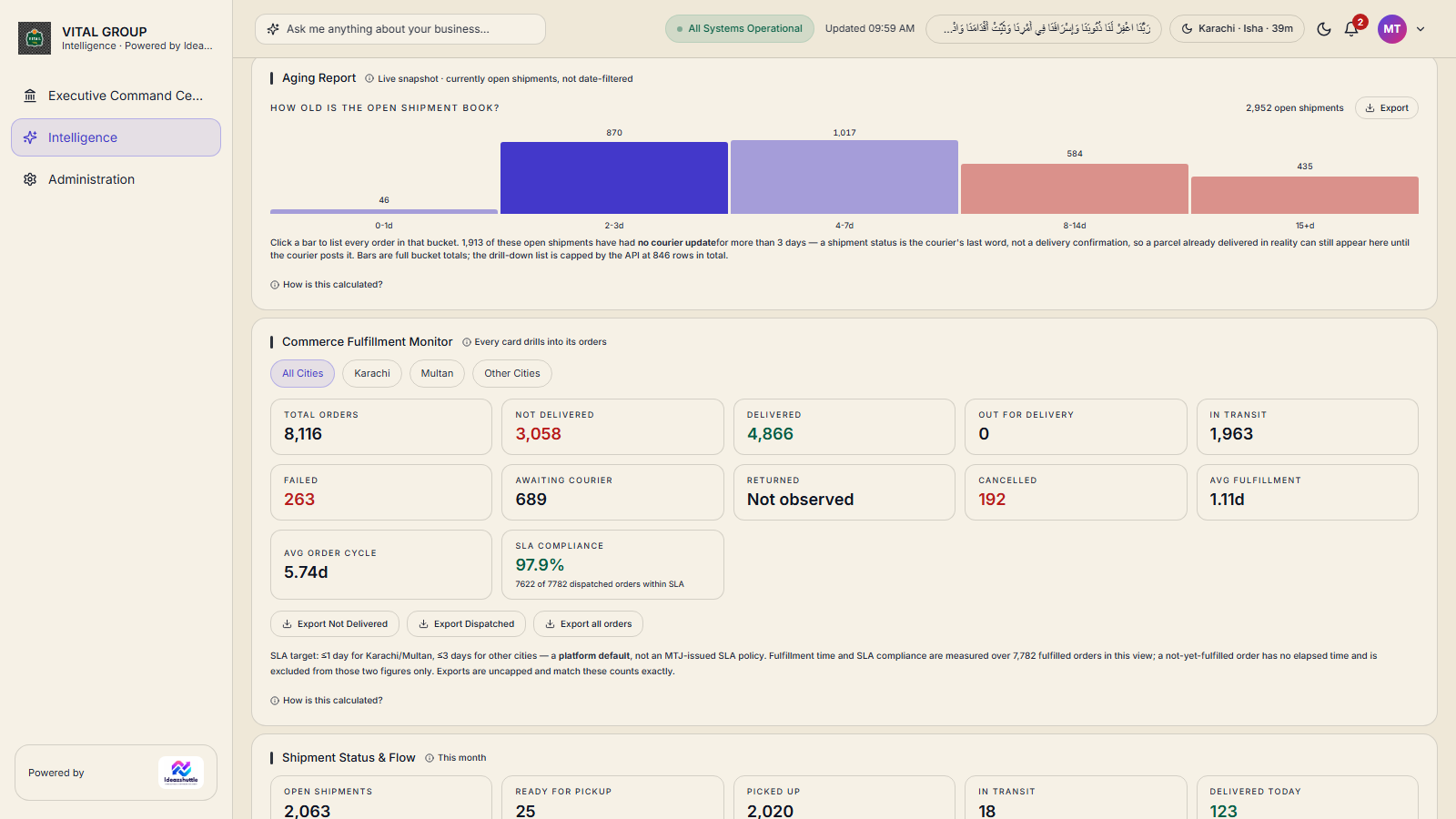
- Order aging — 0–1, 2–3, 4–7, 8–14 and 15+ days for open orders; settled orders are measured as turnaround instead.
- By courier — orders, delivered, failed and value per courier.
- Commerce Fulfilment Monitor — total orders, not delivered, delivered, out for delivery, with the order rows behind each.
SLA, processing time and the aging report
- SLA — stated as "N of M dispatched orders within SLA", with the city view (Karachi, Multan, other cities).
- Aging report — open shipments by bucket with a CSV export; per-order courier-silence disclosure where the courier has sent no event.
- Operational Processing Time — measured within business hours (10:00–18:00 PKT, Monday to Saturday) and shown beside the unchanged total elapsed time.
- Delayed Before Pickup — flagged when more than 24 real hours have passed since the parcel was ready for pickup.
- Courier Operations — courier comparison and courier details, each row opening its open shipments; a live snapshot of courier congestion.
- Find shipment — search an order or shipment and open its timeline. Incident Management — manually logged fulfilment issues (missing item, damaged, short parcel).
- Evidence — Dispatched, Delivered and Not Delivered each open the shipment list, then the individual shipment.
Meta Intelligence and the Campaign Builder
- Live Campaigns — Meta paid campaigns ranked by ROAS; drill Campaign → Ad Set → Ad → Creative.
- Audience — age × gender delivery. Creative Fatigue — frequency-based saturation. Budget Recommendations — per campaign, with evidence.
- Content Intelligence and Seasonal Trend from organic posts, when post data is recorded.
- Campaign Builder — 1 Product · 2 Intelligence · 3 Creative · 4 AI Proposal · 5 Meta Setup · 6 Review · 7 Go Live. The system gathers evidence and proposes the setup; the user approves.
Account-wide Meta ↔ Shopify attribution is disclosed on screen as not available (no verified join key); a per-campaign approximate match exists inside the drill-down and is labelled as such.
Marketing Intelligence
- Creative Performance — strongest and weakest creatives over 7, 30, 90 or 180 days; format, offer and theme patterns from the business's own ad naming.
- Creative Opportunity Score — a documented score (performance, scale, headroom, freshness) that can be recomputed from the figures shown.
- Reports — weekly and monthly intelligence with a Top 10 and recommended experiments.
- Competitor Information — competitor master, storefront product sync, change events, search, filter and export.
- External Intelligence — the framework exists; no external provider is connected, and the page says so.
Alerts, approvals and the assistant
- Alerts & Actions — six alert types, each with severity, business impact, recommended action, evidence, owner and status. Lifecycle: New → Acknowledged → In Progress → Completed or Rejected, with an audit trail of who changed what and when.
- Transfer Approval Queue — stock-movement recommendations approved or rejected by an authorised role.
- Management Assistant — questions such as "What SKUs are going out of stock within 14 days?", "Why does Shopify differ from MTJ?", "Why are deliveries failing?", "What needs my attention?". Read-only; answers carry evidence, supporting records and links to the relevant dashboard; questions outside the data are declined.
- Notifications — a header bell with the latest items.
Administration and access control
- System Health — backend, database and scheduler status; stuck sync runs.
- Sync Status — Shopify, Meta and ERP sync jobs. API Status — external API connectivity. AI Services — provider status. Product Matching — Meta ↔ product mapping audit.
- User Management — accounts, roles, active flag, business-unit access; administrator password reset.
- Roles & Permissions — built-in Admin, Marketing Manager and Viewer roles plus custom roles; each role is granted the pages and actions it may use.
- Business-unit scoping — a user only sees the units they are granted; the server enforces it on every request.
- Account — self-service password change; other sessions end when the password changes.
OOS Forecast & Replenishment Planner
- Stock-out risk at 7, 14, 30 and 60 days for every SKU and location, from average daily sales and current stock.
- Predicted stock-out date and days of cover; rows with negative balances are refused rather than projected.
- Demand split — E-Commerce, Outlet and Total, from the sales channel recorded by GTech.
- Purchase receipts shown as evidence of replenishment; no open-purchase-order feed exists, so incoming stock is stated as unknown, never assumed.
- Demand spikes, slow and dead stock. CSV export of the plan.
Production velocity-based projection in the Inventory workspace. Not in the product the TimesFM-3 statistical model evaluation — internal, inconclusive, non-commercial licence, not deployed. No approved production forecasting model exists.
How decision support works in practice
- Ranking — every workspace card is ranked Act now, Watch, Healthy or No data, so the reader knows where to click first.
- Business status — the Command Center writes one sentence about the period from the figures themselves.
- Needs My Decision — ranked decision cards with business problem, source data and last-verified time; Needs My Approval — only items genuinely awaiting a decision.
- Why It Happened — reasoning events per domain (sales, inventory, marketing, customers, operations, locations).
- Alerts & Actions and approval queues — the decision is recorded, with the person, the outcome and the time.
- Evidence Standard — a number without evidence is not shown as certain; "insufficient evidence" is a valid state.
Advisory only. Nothing in Business Intelligence executes a business action automatically; recommendations wait for a person to approve them.